MakeMyLoad TMS

Complete Transportation Management System

Streamline your freight operations with our comprehensive TMS solution. Manage loads, customers, carriers, and finances all in one place.

Trusted by hundreds of Freight Brokers, Carriers, Shippers

Your data security and business success are our top priorities

SSL Encrypted

256-bit SSL encryption protects all data transmission

Secure Storage

Enterprise-grade data storage with daily backups

GDPR Compliant

Full compliance with data protection regulations

PCI DSS

Secure payment processing with PCI compliance

ISO 27001

International standard for information security

DOT Compliant

Meets all Department of Transportation requirements

99.9% Uptime

Reliable cloud infrastructure with guaranteed uptime

24/7 Support

Round-the-clock customer support and assistance

1,000+

Active Users

50k+

Loads Processed

99.9%

System Uptime

3+

Years Experience

What Our Customers Say

"MakeMyLoad TMS has revolutionized our operations. The mobile tracking and driver app features are game-changers for our business."

John Smith CEO, Logistics Operations

"The financial management features and QuickBooks integration have saved us countless hours and improved our accuracy significantly."

Sarah Johnson CFO, Finance Manager

"Customer support is outstanding. They helped us migrate from our old system seamlessly and provided excellent training."

Mike Davis Operations Manager, Fleet Solutions

System Overview

MakeMyLoad TMS is a comprehensive transportation management system designed to streamline your freight operations. Our system provides end-to-end management of loads, customers, carriers, and financial operations.

Key Benefits
  • Complete Load Lifecycle Management
  • Automated Documents & E-Signatures
  • Real-Time Driver Tracking & Mobile Access
  • Integrated Financial Management (Quick Books Available)
  • Advanced Lead Management System
  • ELD & Fleet Management
  • Customer Web App – Track freight in real-time
  • Driver Web App – Update pickups & deliveries instantly
  • No Installation Needed – Works on any browser
  • All-in-One Hub – Documents, drivers, customers & tracking together
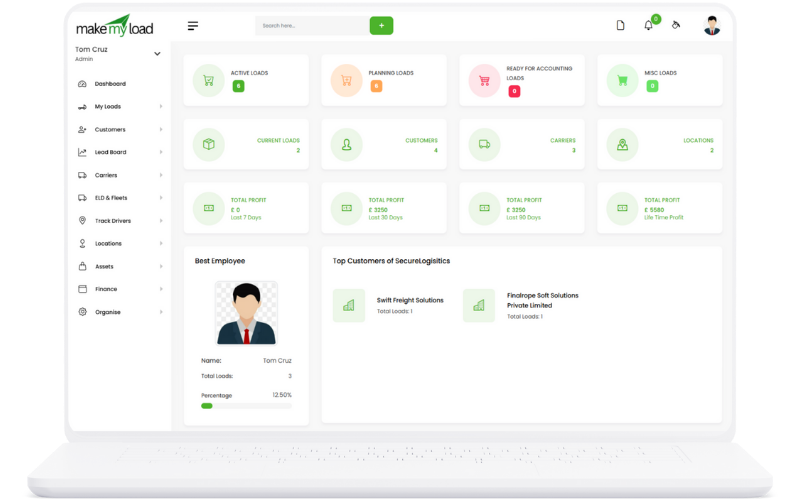
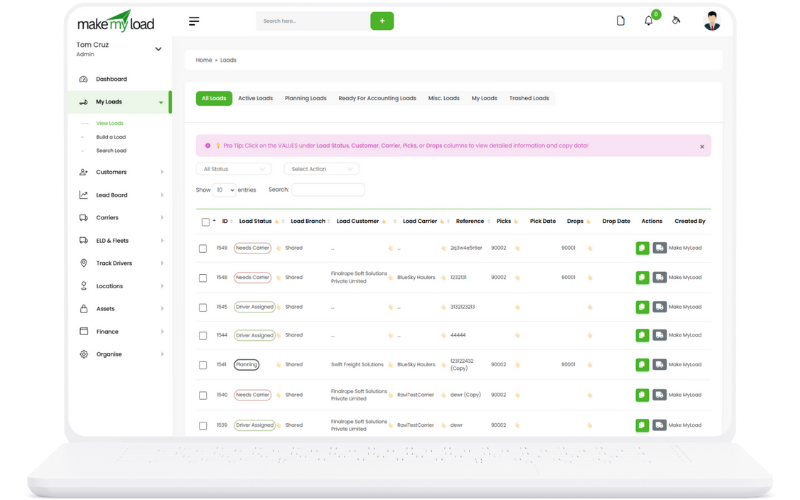
MakeMyLoad Dashboard

Load Management

Manage all your freight loads efficiently with full documentation and tracking capabilities.

Load Management

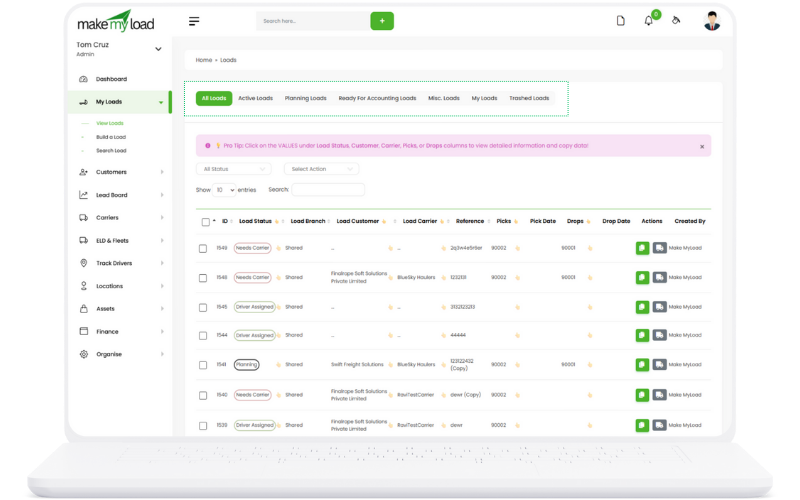
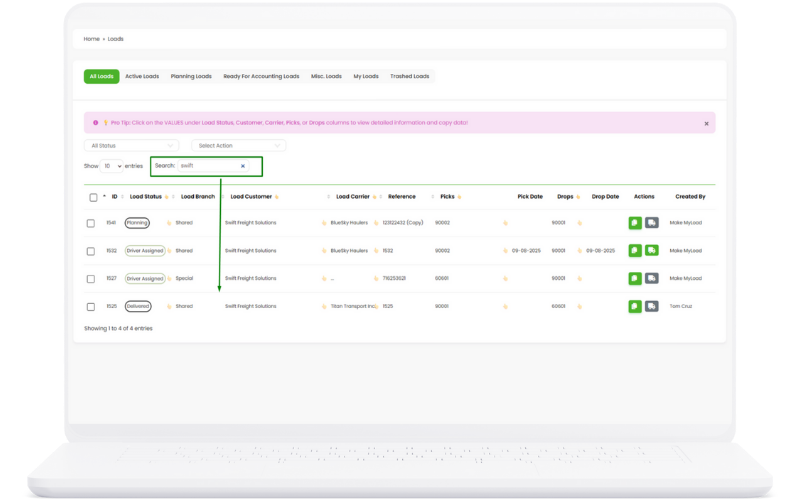
Filter and View All Loads

Efficiently filter and view loads by status - active, planned, or completed - with advanced search capabilities.

Load Management
How to Use:
  1. Navigate to the My Loads section
  2. Use the status filter to select: All Loads, Active Loads and so on
  3. Apply additional filters like Load Status & Action
  4. Use the search bar to find specific loads by number or reference
  5. Sort results by date, status, or value using the column headers
Key Benefits:
  • Quick access to loads by operational status
  • Reduced time spent searching for specific loads
  • Better organization of workload
  • Improved operational visibility

Manage Loads with Ease

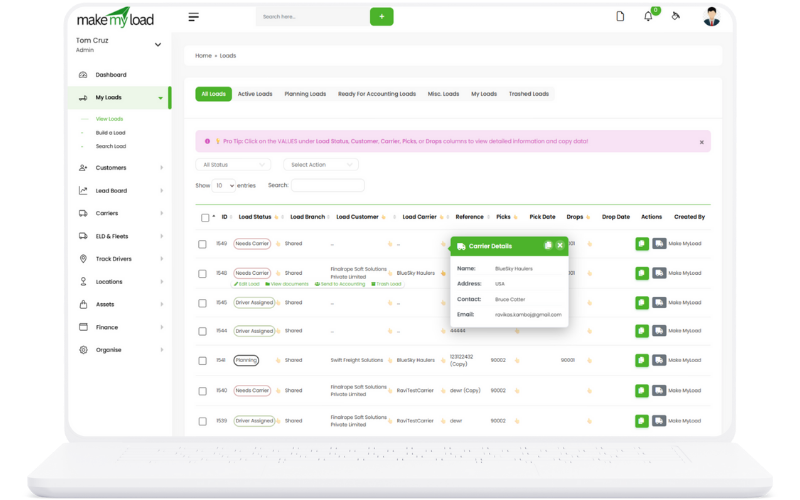
Intuitive interface designed for efficiency with quick view functionality and quick action buttons.

Load Management
Interface Features:
  1. Clean, organized table layout with all essential information
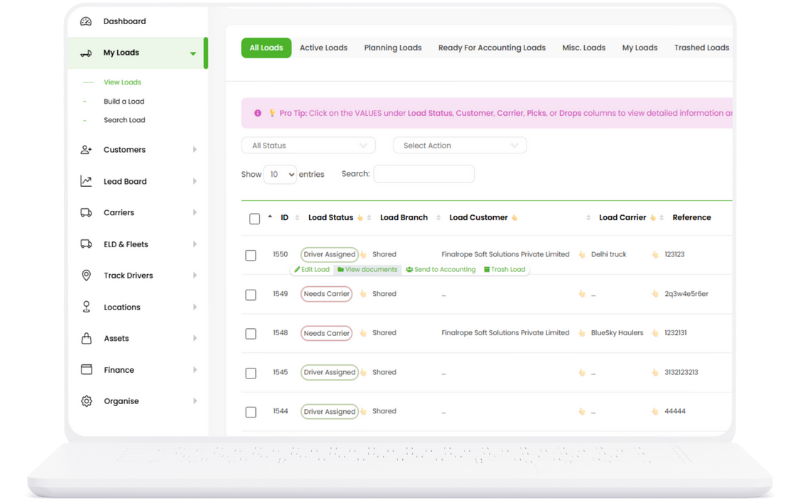
  2. Quick action buttons for common tasks (Edit, View, Email)
  3. Click on hands icon to see quick information
  4. Responsive design that works on all devices
Key Benefits:
  • Reduced learning curve for new users
  • Faster load management operations
  • Consistent user experience across all modules
  • Mobile-friendly interface for on-the-go management

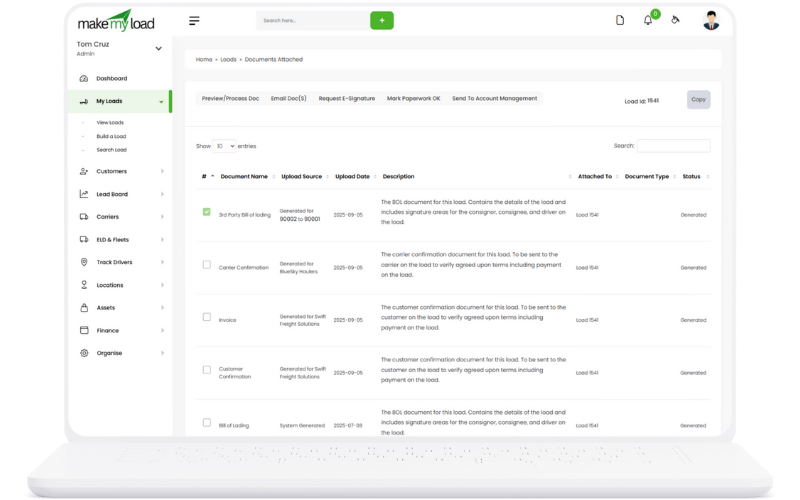
Automatic Document Generation

Click on View Documents and Automatically generate all necessary documents including carrier agreements, customer invoices, bills of lading, and third-party documentation.

Load Management
Document Types:
  1. Carrier Documents: Rate confirmations, pickup/delivery instructions
  2. Customer Invoices: Detailed billing with line items and terms
  3. Bill of Lading: Standard BOL with all required information
  4. Third-Party BOL: Specialized documentation for brokers
  5. Rate Confirmations: Detailed rate agreements and terms
Key Benefits:
  • Eliminates manual document creation
  • Ensures consistency across all documents
  • Reduces errors and omissions
  • Saves significant time on paperwork
  • Professional document formatting

Preview, Approve, and Request E Signature Documents

Review and approve all documents before sending for signatures with built-in verification tools.

Load Management
Approval Process:
  1. Generate documents from the load management interface
  2. Preview each document in a popup window
  3. Verify all information is accurate and complete
  4. Make any necessary edits directly in the preview
  5. Approve documents for signature collection
  6. Track approval status and history
Key Benefits:
  • Quality control before document distribution
  • Reduces errors and disputes
  • Maintains professional standards
  • Audit trail for compliance
  • Confidence in document accuracy

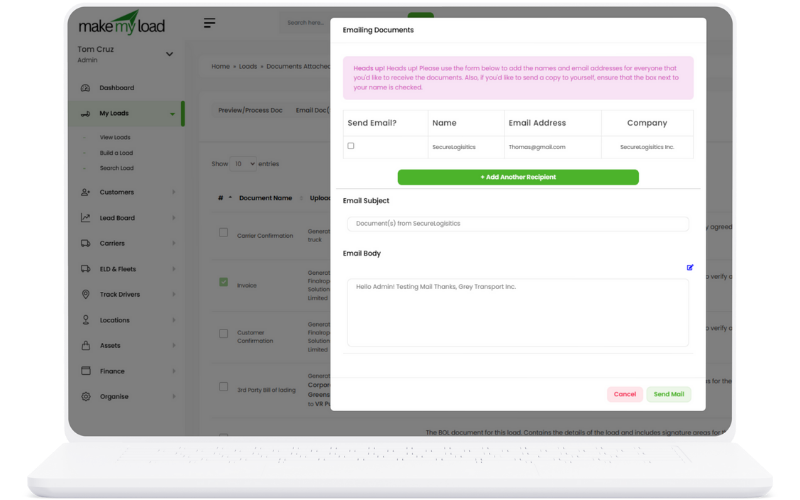
Send Documents via Email

Send documents directly from the system with customizable email templates and tracking capabilities.

Load Management
Email Process:
  1. Select documents to send from the load interface
  2. Choose recipients (customer, carrier, or both)
  3. Select from pre-built email templates
  4. Customize email message if needed
  5. Send documents with tracking enabled
  6. Receive delivery and read confirmations
Key Benefits:
  • Streamlined communication process
  • Professional email templates
  • Delivery confirmation and tracking
  • Reduced manual email handling
  • Centralized communication history

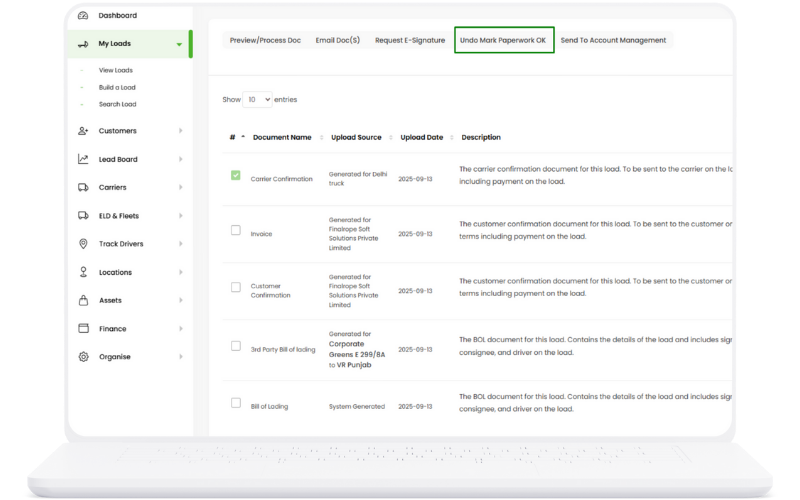
Paperwork Status

Track and manage paperwork status with dedicated features for document completion and approval workflow.

Load Management
Paperwork Management:
  1. Status Tracking: Monitor paperwork completion status in real-time
  2. Document Workflow: Track documents through approval stages
  3. Completion Alerts: Receive notifications when paperwork is due
  4. Status Updates: Update paperwork status with one click
  5. Compliance Monitoring: Ensure all required documents are completed
  6. Audit Trail: Maintain complete history of paperwork changes
Key Benefits:
  • Improved compliance tracking
  • Reduced paperwork delays
  • Better document organization
  • Automated status updates
  • Complete audit trail

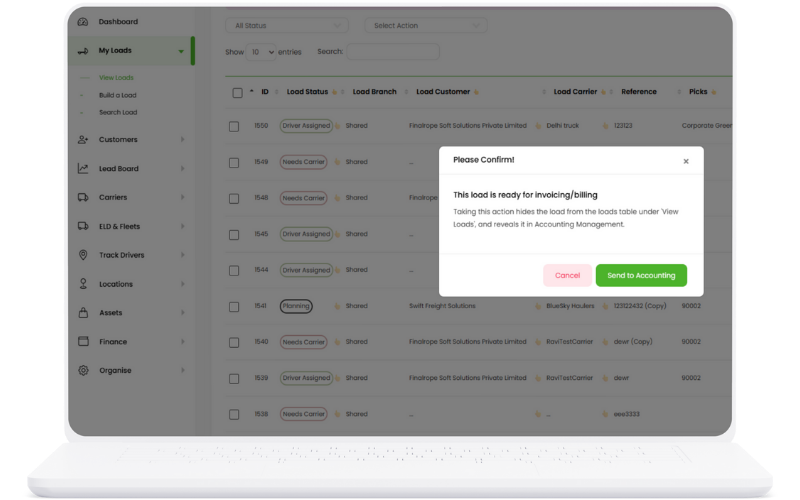
Accounting Integration

Seamlessly integrate load data with accounting systems for automated financial processing and reporting.

Load Management
Integration Features:
  1. QuickBooks Sync: Direct integration with QuickBooks accounting
  2. Automated Entries: Load data flows automatically to accounting
  3. Invoice Generation: Create invoices directly from load data
  4. Payment Tracking: Monitor payment status and history
  5. Financial Reports: Generate comprehensive financial reports
  6. Data Validation: Ensure accuracy of financial data transfer
Key Benefits:
  • Eliminated manual data entry
  • Improved financial accuracy
  • Streamlined accounting processes
  • Real-time financial visibility
  • Reduced accounting errors

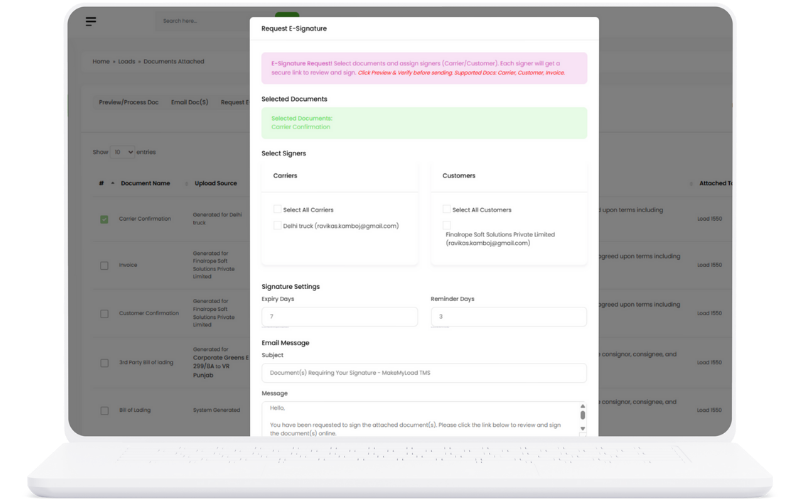
E-Signatures

Request and collect electronic signatures from carriers and customers for faster document processing and approval.

Load Management
E-Signature Features:
  1. Signature Requests: Send signature requests via email or SMS
  2. Mobile Signing: Sign documents on any mobile device
  3. Document Security: Secure signature collection and storage
  4. Signature Tracking: Monitor signature status and completion
  5. Legal Compliance: Meet electronic signature legal requirements
  6. Audit Trail: Complete record of signature activities
Key Benefits:
  • Faster document processing
  • Reduced paper usage
  • Improved customer experience
  • Legal compliance assurance
  • Complete signature audit trail

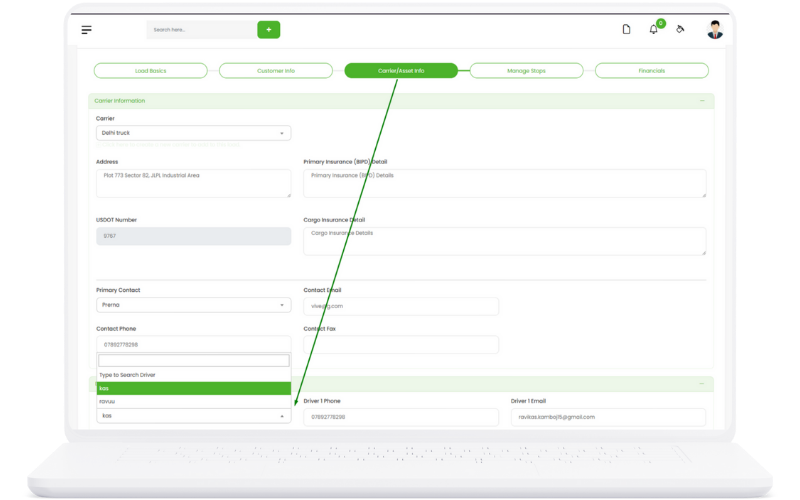
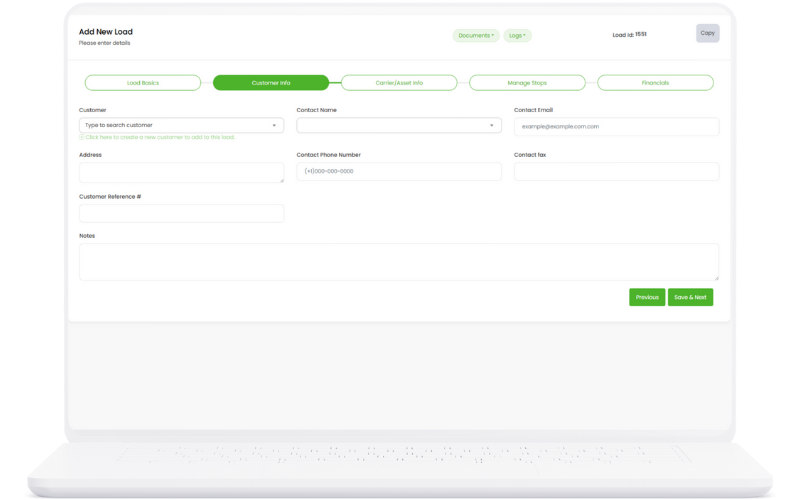
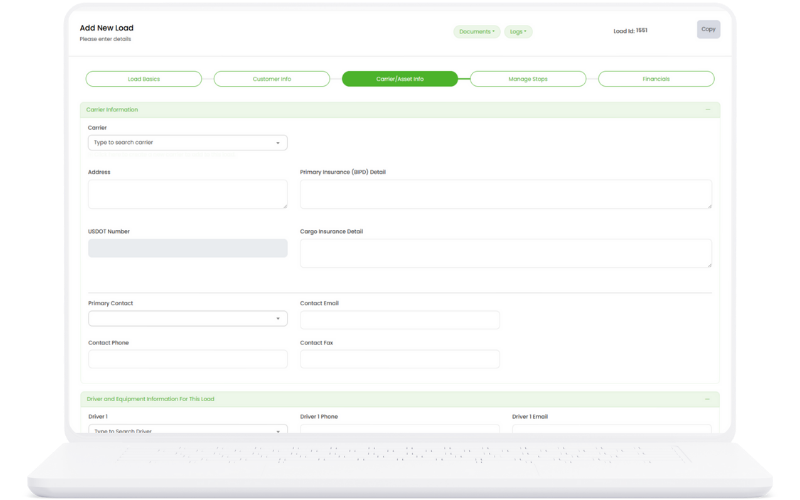
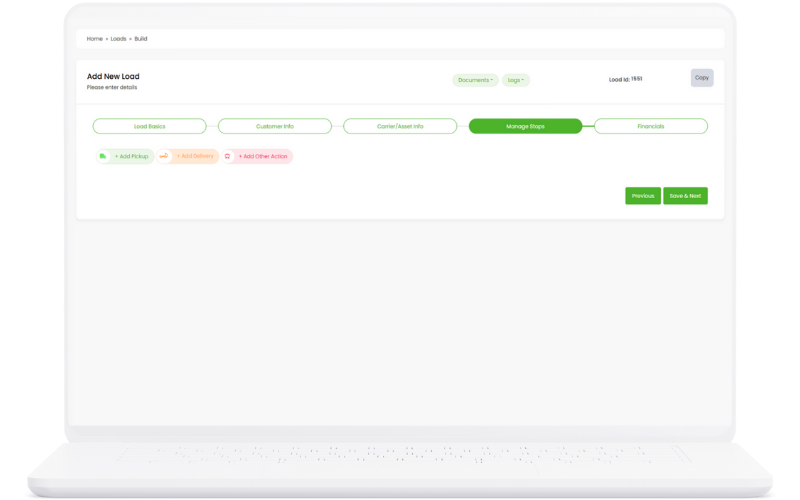
Step-by-Step Creation

Guided load creation process with step-by-step instructions for adding customers, carriers, stops, and expenses.

Load Management
Creation Process:
  1. Step 1 - Customer: Select or add customer information
  2. Step 2 - Carrier: Choose carrier and equipment details
  3. Step 3 - Stops: Add pickup and delivery locations
  4. Step 4 - Expenses: Record fuel, tolls, and other costs
  5. Step 5 - Documents: Attach required documents
  6. Step 6 - Review: Final review and load creation
Key Benefits:
  • Reduced creation errors
  • Consistent data entry
  • User-friendly interface
  • Complete load information
  • Efficient workflow

Driver Assignment

Assign drivers to loads with comprehensive driver management including qualifications, availability, and performance tracking.

Load Management
Driver Assignment Process:
  1. Driver Selection: Choose from available qualified drivers
  2. Qualification Check: Verify driver certifications and endorsements
  3. Availability Check: Confirm driver availability and HOS compliance
  4. Equipment Assignment: Assign power unit and trailer to driver
  5. Route Planning: Plan optimal routes for driver efficiency
  6. Communication Setup: Establish communication channels
  7. Performance Tracking: Monitor driver performance and safety
  8. Backup Planning: Assign backup drivers for contingencies
Key Benefits:
  • Optimal driver utilization
  • Compliance assurance
  • Improved safety records
  • Better load coverage
  • Enhanced communication
  • Performance optimization

On-the-Fly Creation

Create customers and carriers instantly during load creation without page refreshes or navigation delays.

Load Management
On-the-Fly Features:
  1. Quick Customer Add: Add new customers without leaving load creation
  2. Instant Carrier Creation: Create carriers on-demand
  3. No Page Refresh: Seamless creation experience
  4. Auto-Population: New entities auto-populate in dropdowns
  5. Validation: Real-time validation of new entries
  6. Save & Continue: Continue load creation after adding entities
Key Benefits:
  • Faster load creation
  • Improved user experience
  • No workflow interruption
  • Seamless data entry
  • Increased productivity

Notes Management

Add private and public notes for each load to maintain detailed records and communication history.

Load Management
Notes Features:
  1. Private Notes: Internal notes visible only to your team
  2. Public Notes: Notes visible to customers and carriers
  3. Note Categories: Organize notes by type and importance
  4. Timestamp Tracking: Automatic timestamp for all notes
  5. User Attribution: Track who added each note
  6. Note History: Complete history of all note changes
Key Benefits:
  • Better communication tracking
  • Improved record keeping
  • Enhanced team collaboration
  • Complete load history
  • Professional documentation

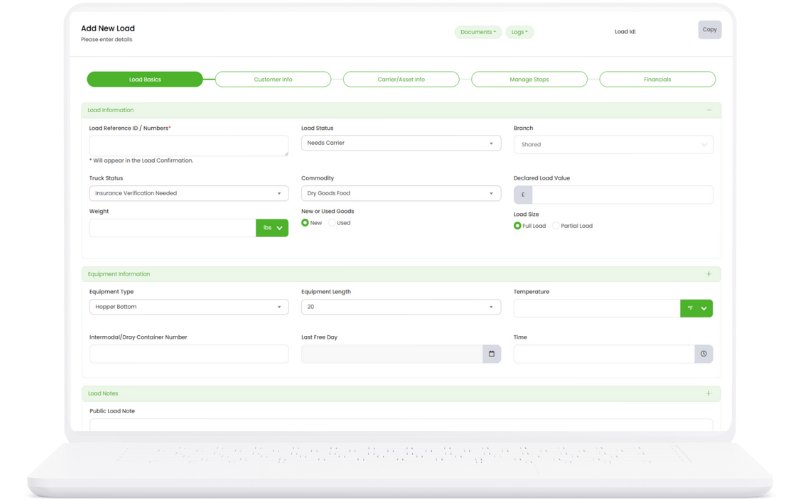
Load Details

Comprehensive load information management including pickup, delivery, and detailed load specifications.

Load Management
Detail Management:
  1. Pickup Assignment: Add load pickup deails
  2. Delivery Values: Add load delivery deails
  3. Load Specifications: Weight, dimensions, and special requirements
  4. Equipment Details: Trailer type, temperature requirements
  5. Rate Information: Detailed rate breakdown and calculations
Key Benefits:
  • Complete load documentation
  • Better organization
  • Improved compliance tracking
  • Detailed reporting capabilities
  • Customizable data fields

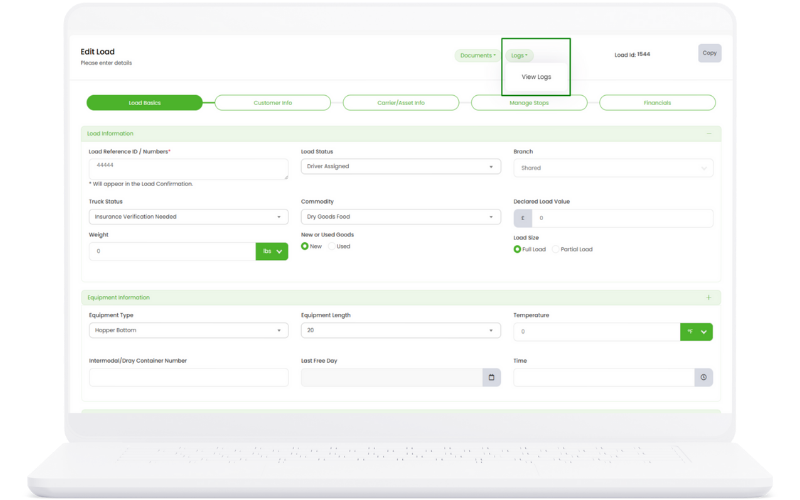
History Tracking

Track complete load history logs from the top menu with detailed activity tracking and audit trails.

Load Management
History Features:
  1. Activity Logs: Track all load-related activities
  2. Status Changes: Monitor load status transitions
  3. User Actions: Record who made what changes
  4. Timestamp Tracking: Precise timing of all activities
  5. Change Details: Detailed before/after change records
  6. Export History: Export history data for analysis
Key Benefits:
  • Complete audit trail
  • Better accountability
  • Improved troubleshooting
  • Compliance documentation
  • Performance analysis

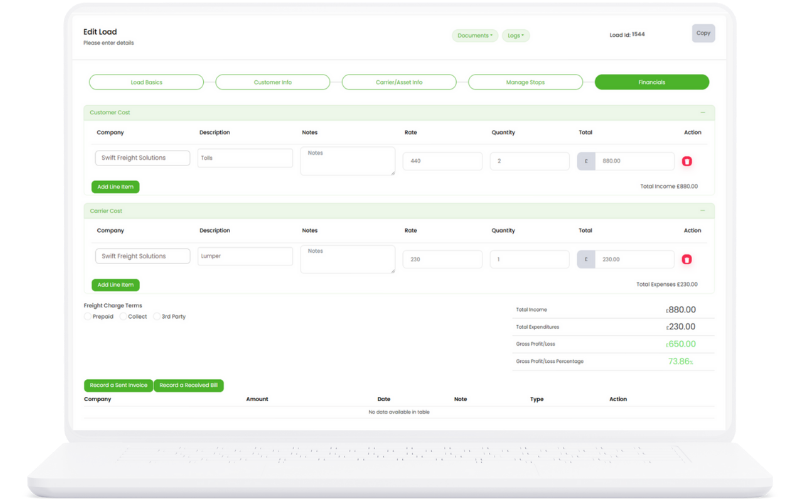
Bills & Invoices

Record bills and invoices during load creation with automatic updates to financial management system.

Load Management
Financial Features:
  1. Invoice Creation: Generate customer invoices during load creation
  2. Bill Recording: Record carrier bills and expenses
  3. Automatic Updates: Financial data flows to accounting system
  4. Payment Tracking: Monitor invoice and bill payment status
  5. Financial Reports: Generate detailed financial reports
  6. Tax Calculations: Automatic tax calculations and compliance
Key Benefits:
  • Streamlined billing process
  • Improved cash flow management
  • Reduced accounting errors
  • Better financial visibility
  • Automated compliance

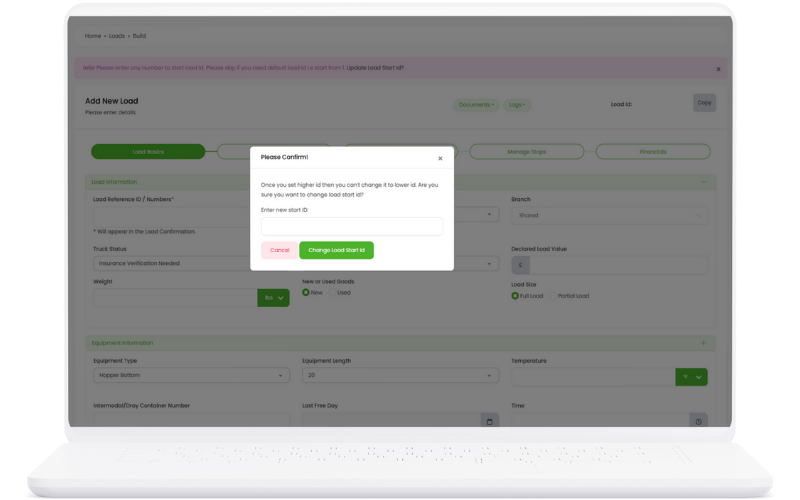
Load Numbering

Set your own starting load number with automatic incrementing for subsequent loads and easy identification.

Load Management
Numbering Features:
  1. Custom Starting Number: Set your own starting load number (e.g., 66780)
  2. Auto-Increment: Subsequent numbers automatically increment
  3. Number Formatting: Customize number format and prefixes
  4. Duplicate Prevention: System prevents duplicate load numbers
  5. Number Validation: Ensure load numbers meet your criteria
  6. Number History: Track all assigned load numbers
Key Benefits:
  • Consistent load identification
  • Easy load tracking
  • Custom numbering system
  • Reduced numbering errors
  • Professional organization

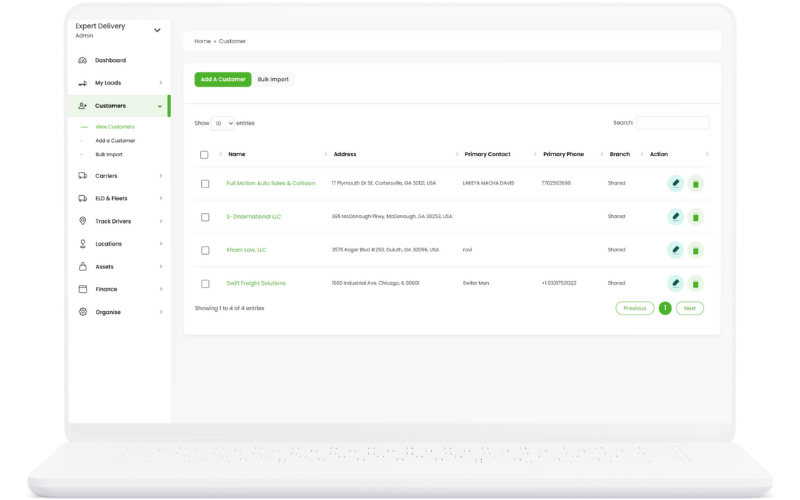
Customer Management

Organize and manage your customers efficiently with advanced features and Google integration.

Load Management

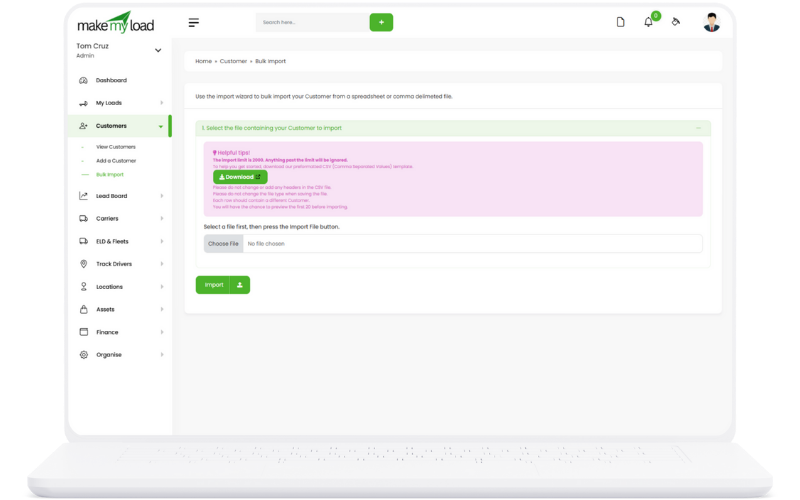
Add Customers Individually or Bulk Import

Flexible customer addition with both individual entry and bulk import capabilities for efficient data management.

Load Management
How to Add Customers:
  1. Individual Addition: Click "Add Customer" button to open the customer form
  2. Bulk Import: Use the "Import Customers" feature to upload CSV/Excel files
  3. Template Download: Download the import template for proper formatting
  4. Data Validation: System validates imported data and shows errors
  5. Preview Import: Review imported data before final confirmation
  6. Complete Import: Confirm import to add all customers to the system
Key Benefits:
  • Quick setup for new TMS implementations
  • Efficient migration from other systems
  • Reduced data entry time
  • Data validation prevents errors
  • Flexible import formats supported

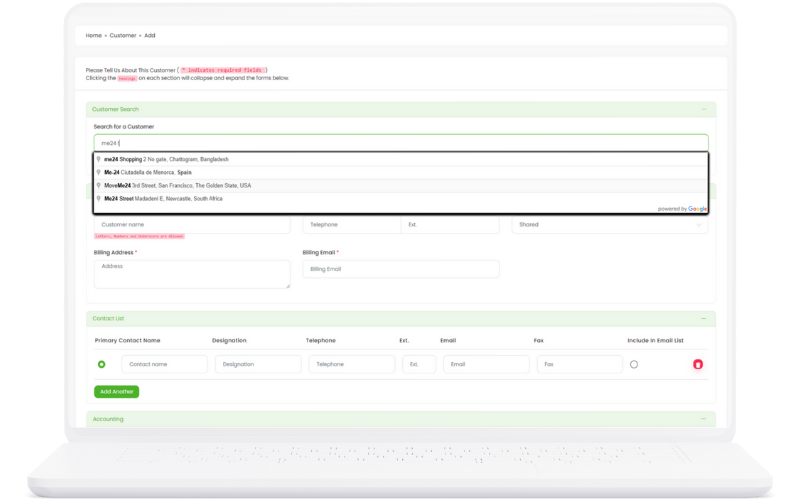
Google Integration for Customer Search
Search and add customers via Google integration directly from TMS with real-time business information.

Load Management
Google Search Process:
  1. Click "Search Google" button in customer addition form
  2. Enter company name or business address
  3. Select from Google's verified business listings
  4. Review business information (address, phone, website)
  5. Auto-populate customer form with verified data
  6. Add additional custom information as needed
Key Benefits:
  • Verified business information
  • Reduced data entry errors
  • Up-to-date contact information
  • Professional business verification
  • Time-saving data population

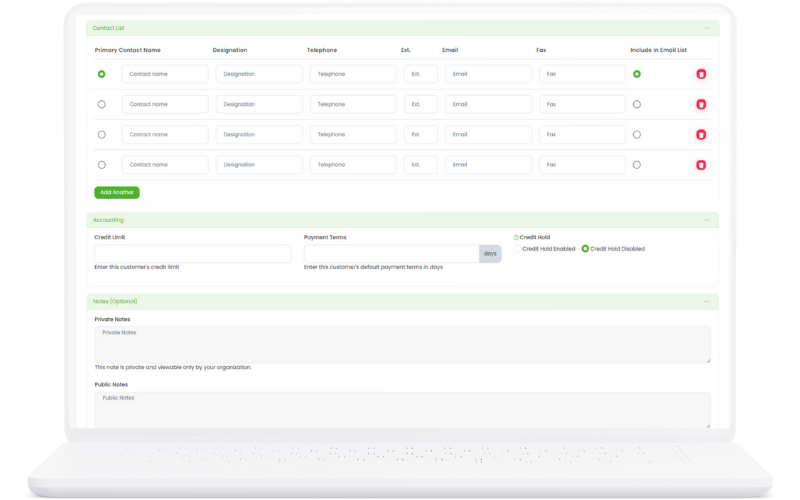
Primary and Additional Contact Management

Comprehensive contact management with primary contacts and unlimited additional contacts for each customer.

Load Management
Contact Management Features:
  1. Primary Contact: Set main contact with email and phone
  2. Additional Contacts: Add unlimited secondary contacts
  3. Contact Roles: Assign roles (Billing, Operations, Sales)
  4. Communication Preferences: Set preferred contact methods
  5. Contact History: Track all communication with each contact
  6. Bulk Contact Import: Import multiple contacts via CSV
Key Benefits:
  • Complete contact visibility
  • Role-based communication
  • Improved customer service
  • Reduced communication errors
  • Better relationship management

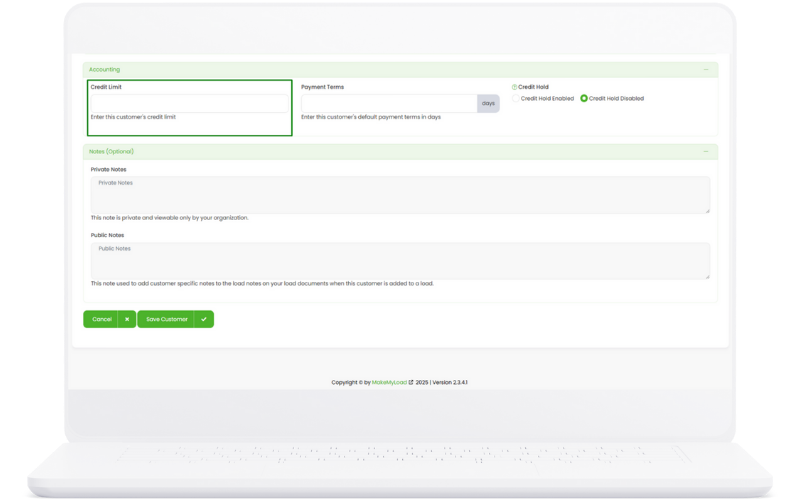
Credit Limit Management

Set and manage customer credit limits with automatic load blocking when limits are exceeded.

Load Management
Credit Management Process:
  1. Set credit limit amount for each customer
  2. Monitor current outstanding balance
  3. Receive alerts when approaching limit
  4. Automatic load blocking when limit exceeded
  5. Manual override capability for managers
  6. Credit limit history and adjustments tracking
Key Benefits:
  • Risk management and protection
  • Automated credit monitoring
  • Prevents overextension
  • Improved cash flow management
  • Compliance with credit policies

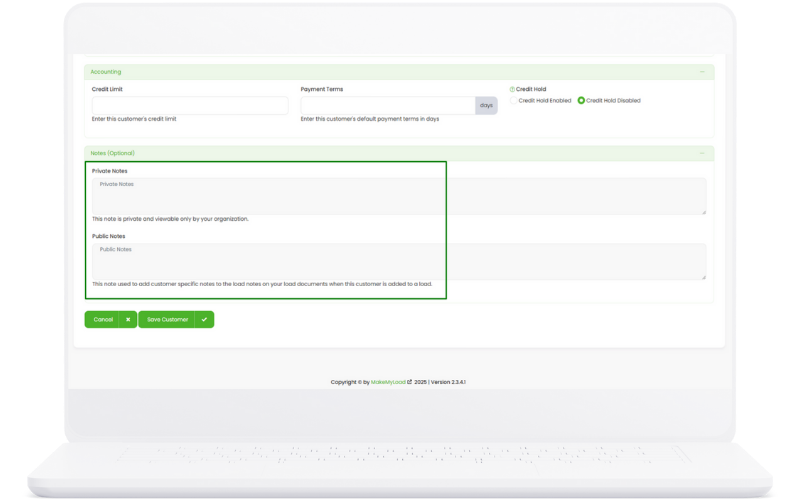
Private and Public Notes System

Comprehensive notes system with private internal notes and public customer-facing notes.

Load Management
Notes Management:
  1. Private Notes: Internal notes visible only to your team
  2. Public Notes: Customer-facing notes for transparency
  3. Note Categories: Organize notes by type (Billing, Service, Issues)
  4. Rich Text Editor: Format notes with bold, italic, lists
  5. Note History: Track all note changes and updates
  6. Search Notes: Find specific information quickly
Key Benefits:
  • Complete customer context
  • Team knowledge sharing
  • Customer transparency
  • Historical record keeping
  • Improved customer service

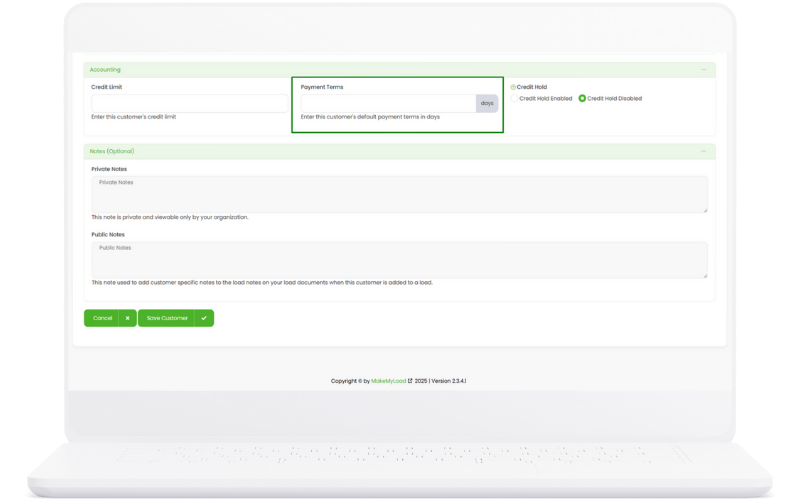
Payment Terms Management

Define and manage payment terms in days for each customer with automatic due date calculations.

Load Management
Payment Terms Setup:
  1. Set payment terms in days (e.g., Net 30, Net 15)
  2. Configure grace period for late payments
  3. Set early payment discounts if applicable
  4. Define late payment penalties
  5. Automatic due date calculation on invoices
  6. Payment term history and changes tracking
Key Benefits:
  • Automated due date calculations
  • Consistent payment terms
  • Improved cash flow planning
  • Reduced billing disputes
  • Professional payment management

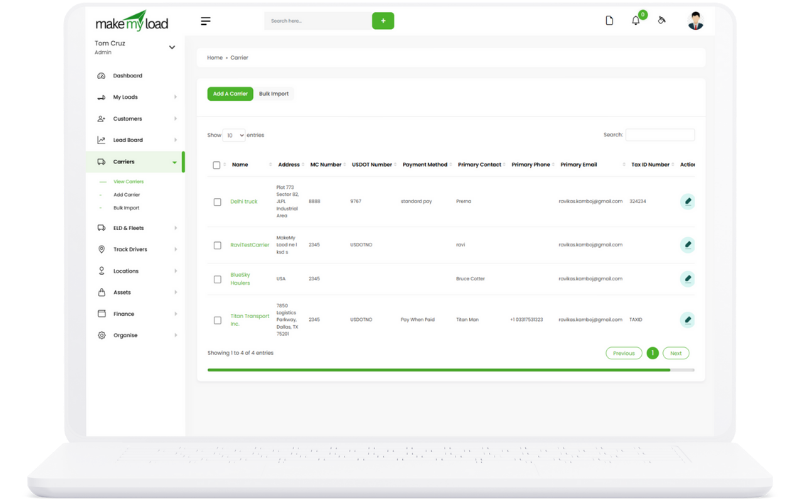
Carrier Management

Manage your carriers with full details, compliance, and communication options.

Load Management

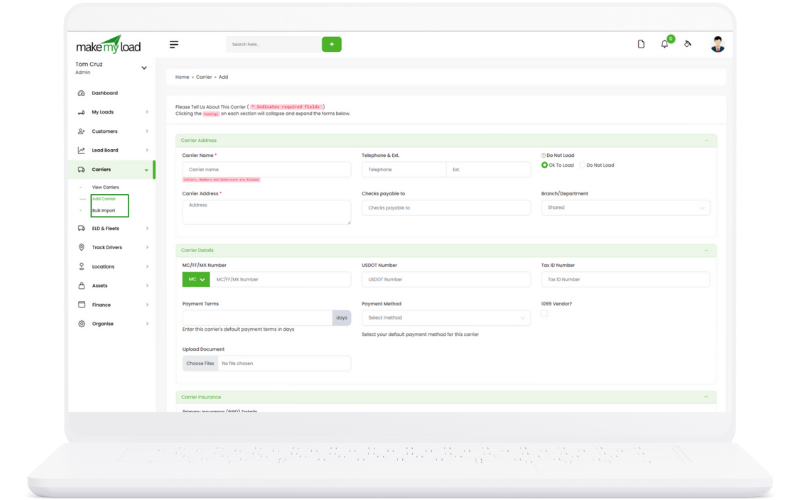
Add Carriers Individually or Bulk Import

Flexible carrier addition with both individual entry and bulk import capabilities for efficient carrier database management.

Load Management
How to Add Carriers:
  1. Individual Addition: Click "Add Carrier" to open the carrier form
  2. Bulk Import: Use "Import Carriers" to upload CSV/Excel files
  3. Template Download: Download carrier import template
  4. Data Validation: System validates MC, USDOT, and TAX ID numbers
  5. Duplicate Check: Automatic duplicate detection and resolution
  6. Complete Import: Review and confirm carrier import
Key Benefits:
  • Quick carrier database setup
  • Efficient migration from other systems
  • Data validation prevents errors
  • Duplicate prevention
  • Compliance verification

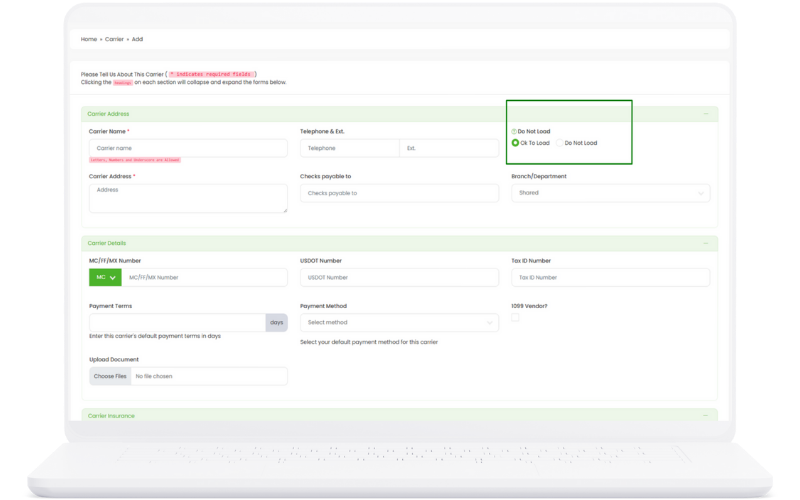
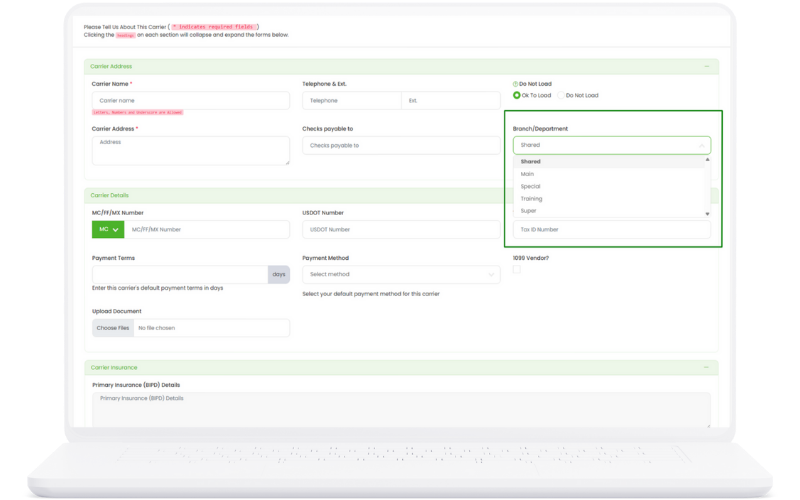
OK to Load / Do Not Load Toggle

Quick toggle system to approve or block carriers from receiving loads with instant status updates.

Load Management
Toggle Management:
  1. Status Toggle: Switch between "OK to Load" and "Do Not Load"
  2. Instant Updates: Status changes apply immediately
  3. Load Filtering: Only "OK to Load" carriers appear in load assignment
  4. Status History: Track all status changes with timestamps
  5. Bulk Status Change: Update multiple carriers at once
  6. Reason Tracking: Add reasons for status changes
Key Benefits:
  • Quick carrier management
  • Prevents unauthorized load assignments
  • Compliance with carrier policies
  • Audit trail for status changes
  • Improved operational control

Branches and Departments Assignment

Assign carriers to specific branches and departments for organized management and reporting.

Load Management
Branch Assignment Process:
  1. Branch Selection: Assign carriers to specific company branches
  2. Department Assignment: Categorize by department (Operations, Sales, etc.)
  3. Territory Management: Define service territories for each branch
  4. Reporting Structure: Generate reports by branch/department
  5. Load Assignment: Automatically assign loads to appropriate branches
  6. Performance Tracking: Monitor carrier performance by location
Key Benefits:
  • Organized carrier management
  • Location-based reporting
  • Territory optimization
  • Performance tracking by region
  • Improved operational efficiency

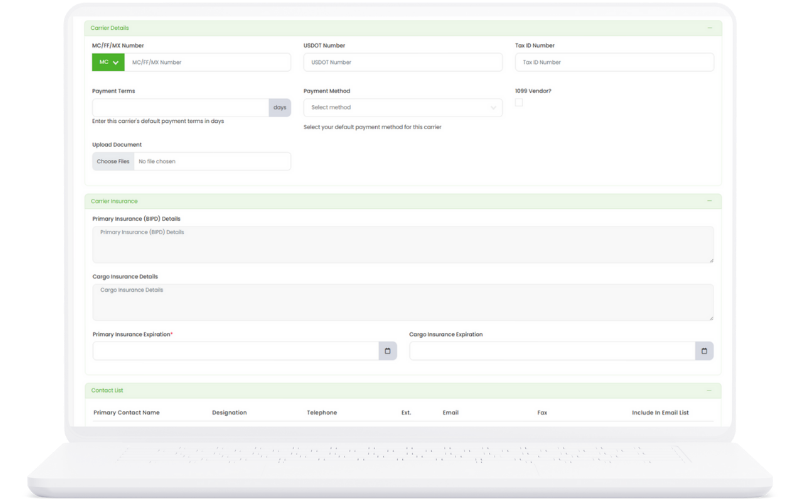
Comprehensive Carrier Information

Record complete carrier information including TAX ID, MC, USDOT, payment terms, and compliance details.

Load Management
Information Management:
  1. Legal Information: TAX ID, MC Number, USDOT Number
  2. Payment Details: Payment terms, methods, and preferences
  3. 1099 Vendor Status: Track 1099 vendor requirements
  4. Document Management: Store and manage carrier documents
  5. Compliance Tracking: Monitor regulatory compliance status
  6. Contact Information: Multiple contact points and methods
Key Benefits:
  • Complete carrier profiles
  • Compliance management
  • Payment processing efficiency
  • Document organization
  • Regulatory compliance

Insurance Details and Expiration Tracking

Maintain comprehensive insurance details with automatic expiration tracking and renewal alerts.

Load Management
Insurance Management:
  1. Policy Information: General liability, cargo, auto insurance details
  2. Coverage Amounts: Track coverage limits and deductibles
  3. Expiration Dates: Set and monitor policy expiration dates
  4. Renewal Alerts: Automatic notifications before expiration
  5. Document Storage: Upload and store insurance certificates
  6. Compliance Monitoring: Ensure minimum coverage requirements
Key Benefits:
  • Risk management and protection
  • Automatic expiration alerts
  • Compliance monitoring
  • Document organization
  • Reduced liability exposure

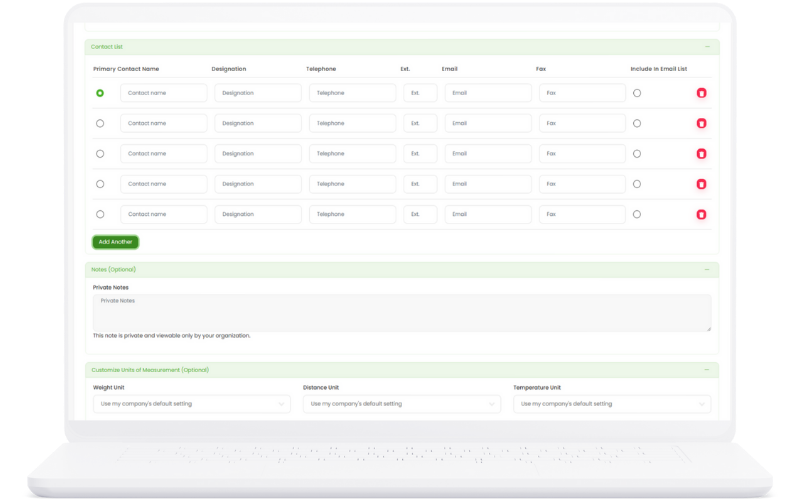
Primary and Additional Contact Management

Manage multiple contacts for each carrier with role assignments and communication preferences.

Load Management
Contact Management Features:
  1. Primary Contact: Set main contact for the carrier
  2. Additional Contacts: Add dispatchers, drivers, billing contacts
  3. Role Assignment: Assign specific roles to each contact
  4. Communication Preferences: Set preferred contact methods
  5. Emergency Contacts: Designate emergency contact information
  6. Contact History: Track all communication with each contact
Key Benefits:
  • Complete contact visibility
  • Role-based communication
  • Emergency contact access
  • Improved carrier relations
  • Better communication efficiency

Private and Public Notes System

Comprehensive notes system for carrier management with private internal notes and public carrier-facing notes.

Load Management
Notes Management:
  1. Private Notes: Internal notes for team use only
  2. Public Notes: Carrier-visible notes for transparency
  3. Performance Notes: Track carrier performance and issues
  4. Service Notes: Record service quality and feedback
  5. Compliance Notes: Document compliance issues and resolutions
  6. Search and Filter: Find specific notes quickly
Key Benefits:
  • Complete carrier context
  • Performance tracking
  • Team knowledge sharing
  • Carrier transparency
  • Historical record keeping

Weight Units and Temperature Preferences

Track carrier preferences for weight units and temperature requirements for specialized load assignments.

Load Management
Preference Management:
  1. Weight Units: Set preferred weight units (lbs, kg, tons)
  2. Temperature Range: Define acceptable temperature ranges
  3. Equipment Capabilities: Track temperature-controlled equipment
  4. Load Matching: Automatically match loads to carrier capabilities
  5. Preference History: Track changes in carrier preferences
  6. Compliance Tracking: Ensure load requirements match capabilities
Key Benefits:
  • Improved load matching
  • Reduced assignment errors
  • Better carrier utilization
  • Compliance with load requirements
  • Optimized load assignments

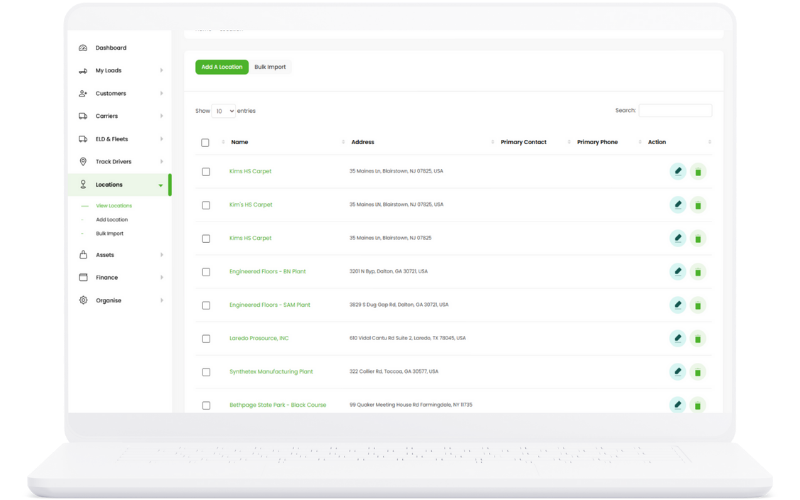
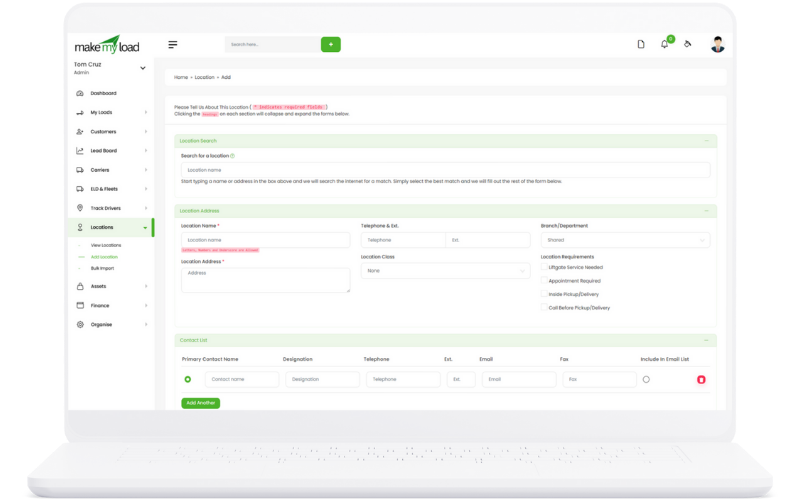
Location Management

Manage locations with ease, including contacts and branches.

Load Management

Add Locations Individually or Bulk Import

Flexible location addition with both individual entry and bulk import capabilities for efficient location database management.

Load Management
How to Add Locations:
  1. Individual Addition: Click "Add Location" to open the location form
  2. Bulk Import: Use "Import Locations" to upload CSV/Excel files
  3. Address Validation: System validates addresses and postal codes
  4. Duplicate Prevention: Automatic duplicate detection
  5. Geocoding: Automatic latitude/longitude assignment
  6. Complete Import: Review and confirm location import
Key Benefits:
  • Quick location database setup
  • Accurate address validation
  • Automatic geocoding
  • Duplicate prevention
  • Efficient bulk operations

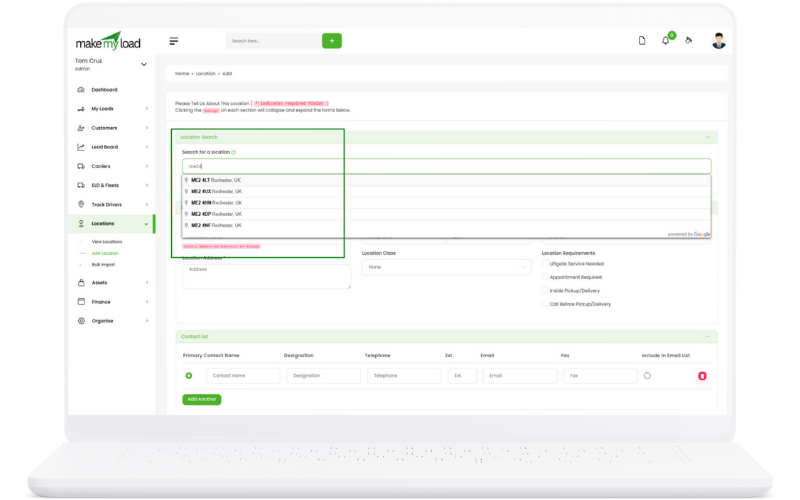
Google Integration for Location Search

Search and add locations via Google integration with real-time address verification and mapping.

Load Management
Google Search Process:
  1. Click "Search Google" button in location form
  2. Enter address or business name
  3. Select from Google's verified locations
  4. Review address details and coordinates
  5. Auto-populate location form with verified data
  6. Add additional location details as needed
Key Benefits:
  • Verified address information
  • Accurate coordinates
  • Reduced data entry errors
  • Professional address formatting
  • Time-saving data population

Asset Management

Manage your fleet assets including power units, trailers, and drivers with comprehensive tracking.

Load Management

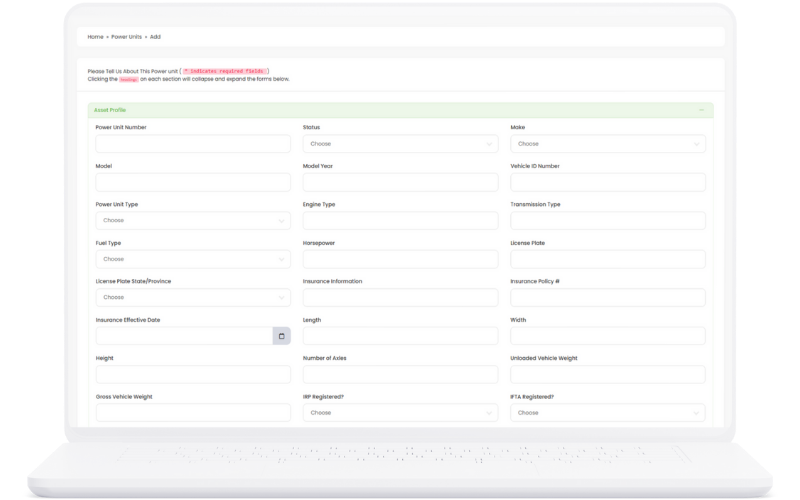
Power Units Management

Comprehensive power unit management including vehicle specifications, maintenance tracking, and operational status monitoring.

Load Management
Power Unit Features:
  1. Vehicle Registration: Complete vehicle information and registration details
  2. Specifications Tracking: Engine, transmission, and performance specs
  3. Maintenance Records: Track all maintenance and repair history
  4. Fuel Efficiency: Monitor fuel consumption and efficiency metrics
  5. Operational Status: Real-time status tracking (Active, Maintenance, Out of Service)
  6. Driver Assignment: Assign drivers to specific power units
  7. Insurance Tracking: Monitor insurance coverage and expiration dates
  8. Compliance Management: Track DOT inspections and compliance status
Key Benefits:
  • Complete vehicle documentation
  • Improved maintenance planning
  • Better fuel efficiency tracking
  • Enhanced compliance management
  • Reduced operational costs

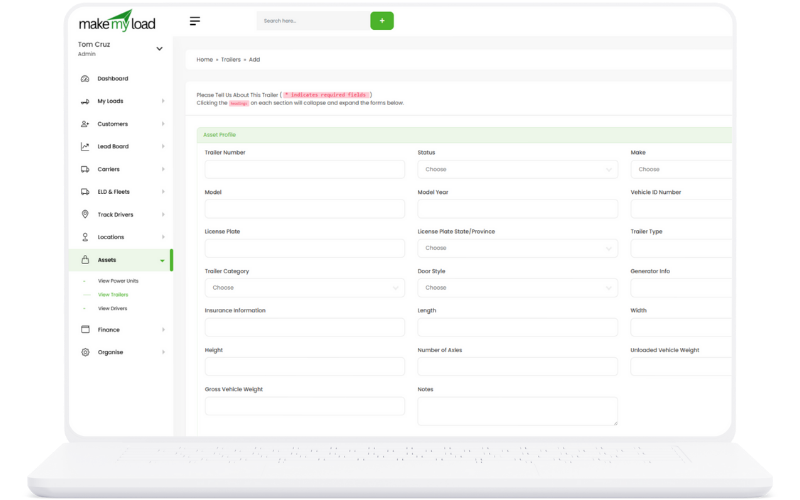
Trailers Management

Complete trailer management system including trailer types, specifications, maintenance, and load assignments.

Asset Management
Trailer Management Features:
  1. Trailer Types: Dry van, refrigerated, flatbed, and specialized trailers
  2. Specifications: Dimensions, weight capacity, and special features
  3. Maintenance Tracking: Regular maintenance schedules and repair history
  4. Load Assignments: Track which loads are assigned to specific trailers
  5. Temperature Control: Monitor refrigerated trailer temperature settings
  6. Availability Status: Real-time trailer availability and location
  7. Inspection Records: Track DOT inspections and safety compliance
  8. Trailer Tracking: GPS tracking and location monitoring
Key Benefits:
  • Optimized trailer utilization
  • Better load matching
  • Improved maintenance scheduling
  • Enhanced compliance tracking
  • Reduced trailer downtime

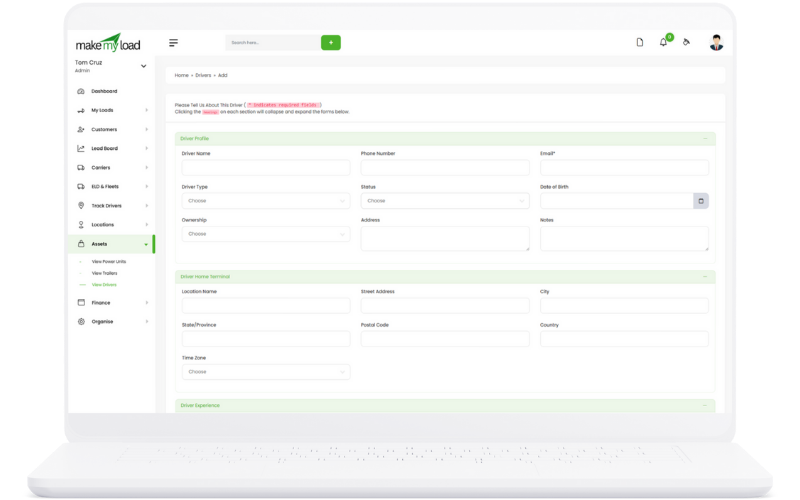
Drivers Management

Comprehensive driver management including qualifications, certifications, performance tracking, and assignment management.

Asset Management
Driver Management Features:
  1. Driver Profiles: Complete driver information and contact details
  2. License Management: Track CDL licenses and endorsements
  3. Certification Tracking: Monitor required certifications and training
  4. Performance Metrics: Track driving performance and safety records
  5. Hours of Service: Monitor HOS compliance and remaining hours
  6. Assignment History: Track driver assignments to loads and vehicles
  7. Medical Certificates: Track medical certificate expiration dates
  8. Training Records: Maintain training history and requirements
Key Benefits:
  • Complete driver documentation
  • Improved compliance management
  • Better driver performance tracking
  • Enhanced safety monitoring
  • Streamlined driver assignments

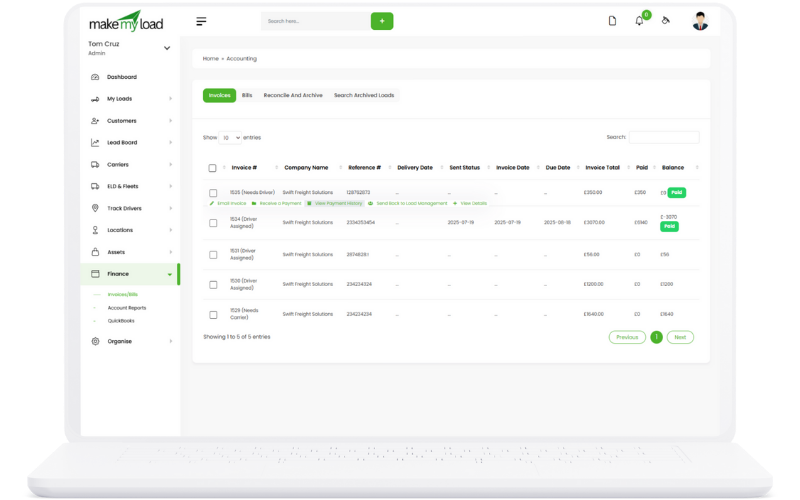
Finance Management

Centralize financial management for your loads with automated data flow and QuickBooks integration.

Finance Management

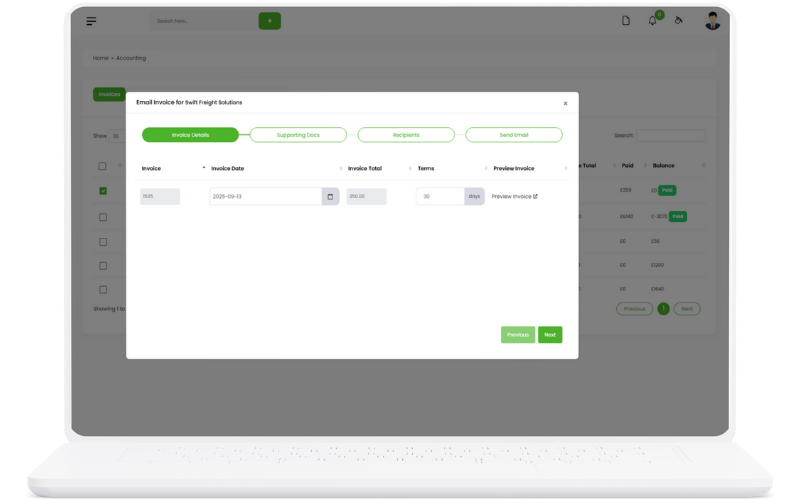
Email Invoice

Automated invoice generation and email delivery system for seamless customer billing and payment collection.

Finance Management
Email Invoice Features:
  1. Invoice Generation: Automatic invoice creation from load data
  2. Email Templates: Professional invoice email templates
  3. Customer Delivery: Send invoices directly to customer email addresses
  4. PDF Attachments: Attach PDF invoices to email notifications
  5. Payment Links: Include secure payment links in invoices
  6. Delivery Tracking: Track invoice delivery and open rates
  7. Reminder System: Automatic payment reminders for overdue invoices
  8. Custom Branding: Customize invoices with company branding
Key Benefits:
  • Faster invoice delivery
  • Professional invoice presentation
  • Reduced manual work
  • Improved payment collection
  • Better customer experience
  • Automated reminder system

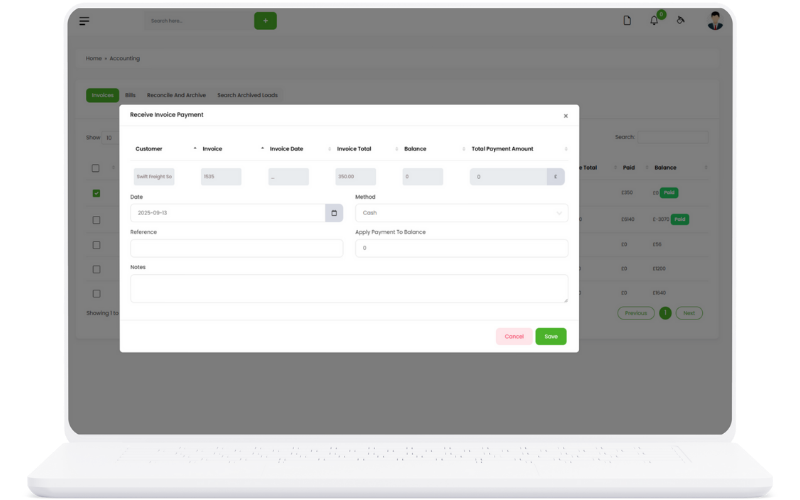
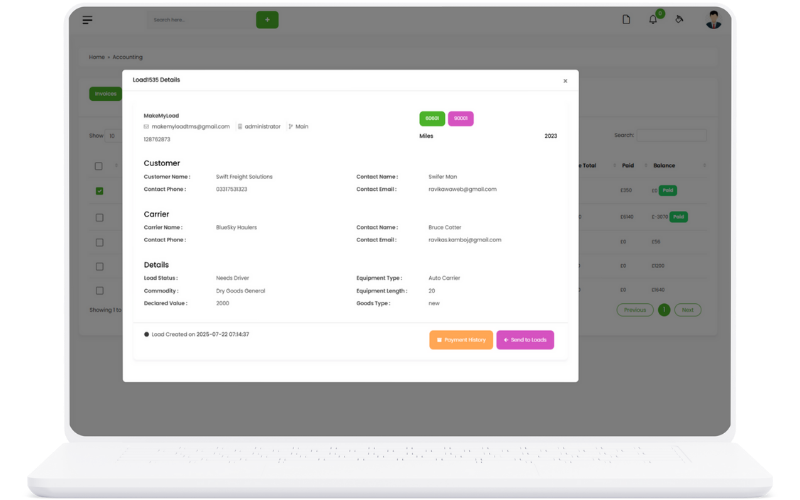
Payment Processing

Comprehensive payment processing system for handling customer payments, carrier bills, and financial transactions.

Finance Management
Payment Processing Features:
  1. Customer Payments: Process and record customer payments
  2. Carrier Bills: Generate and send carrier payment bills
  3. Payment Methods: Support multiple payment methods (ACH, check, wire)
  4. Payment Validation: Validate payment amounts and references
  5. Automated Matching: Match payments to invoices automatically
  6. Payment Confirmation: Send payment confirmations to customers
  7. Refund Processing: Handle payment refunds and adjustments
  8. Payment Analytics: Track payment trends and performance
Key Benefits:
  • Streamlined payment collection
  • Reduced payment processing time
  • Improved cash flow management
  • Enhanced payment security
  • Better payment tracking

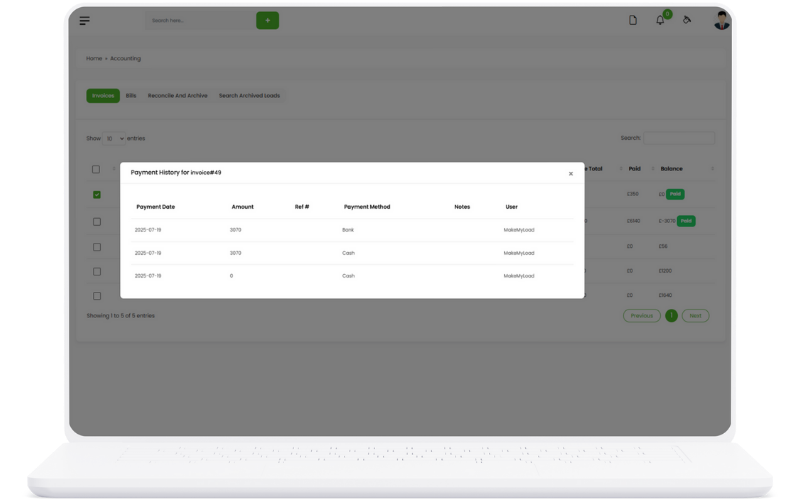
Payment History

Complete payment history tracking with detailed transaction records, reconciliation, and audit trails.

Finance Management
Payment History Features:
  1. Transaction Records: Complete history of all payments and transactions
  2. Payment Reconciliation: Match payments to invoices and loads
  3. Audit Trail: Track all payment-related activities and changes
  4. Payment Status: Monitor payment status (Pending, Completed, Failed)
  5. Search & Filter: Advanced search and filtering capabilities
  6. Export Options: Export payment history for accounting
  7. Payment Reports: Generate detailed payment reports
  8. Dispute Management: Track and resolve payment disputes
Key Benefits:
  • Complete payment transparency
  • Easy reconciliation process
  • Comprehensive audit trail
  • Improved financial accuracy
  • Better dispute resolution

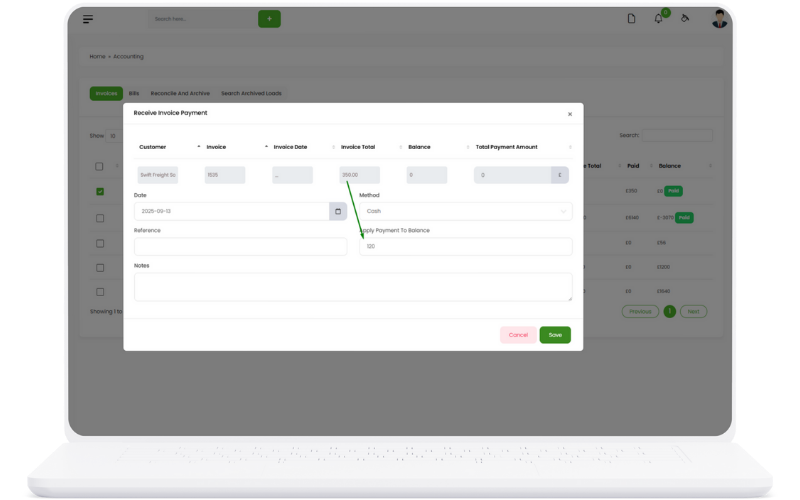
Partial Payments

Flexible partial payment system allowing customers to make multiple payments towards invoices and loads.

Finance Management
Partial Payment Features:
  1. Payment Splitting: Split large invoices into multiple payments
  2. Payment Scheduling: Schedule multiple payment dates
  3. Balance Tracking: Track remaining balances after partial payments
  4. Payment Plans: Create flexible payment plans for customers
  5. Automatic Reminders: Send reminders for upcoming partial payments
  6. Payment Allocation: Allocate partial payments to specific invoices
  7. Interest Calculation: Calculate interest on outstanding balances
  8. Payment Completion: Track progress towards full payment
Key Benefits:
  • Improved customer flexibility
  • Better cash flow management
  • Reduced payment defaults
  • Enhanced customer relationships
  • Flexible payment options

Auto Updates

Automatic financial data updates ensuring real-time synchronization between loads, invoices, and payments.

Finance Management
Auto Update Features:
  1. Load Integration: Automatic financial data flow from loads
  2. Invoice Updates: Real-time invoice status updates
  3. Payment Synchronization: Sync payment data across systems
  4. Balance Calculations: Automatic balance and outstanding amount calculations
  5. Status Changes: Update payment and invoice statuses automatically
  6. Notification System: Send automatic notifications for updates
  7. Data Validation: Validate and correct financial data automatically
  8. Report Generation: Auto-generate updated financial reports
Key Benefits:
  • Real-time financial data
  • Reduced manual updates
  • Improved data accuracy
  • Faster financial processing
  • Better system integration

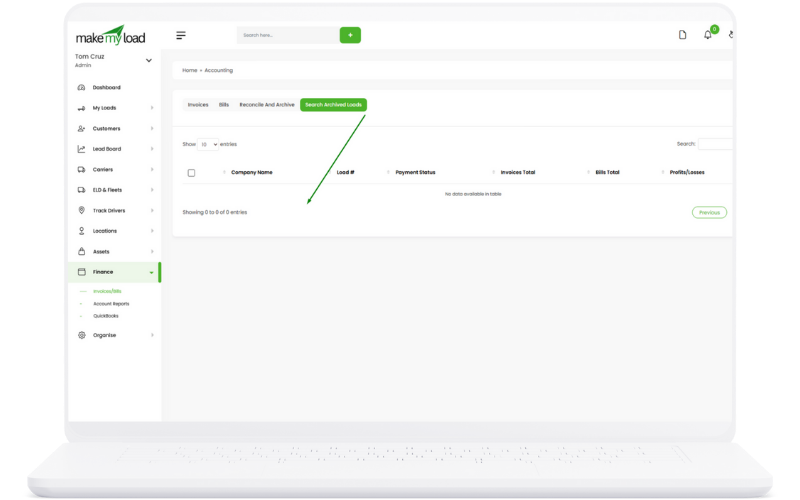
Archive & Restore

Comprehensive archive and restore system for managing completed loads and financial records.

Finance Management
Archive & Restore Features:
  1. Load Archiving: Archive completed loads and their financial data
  2. Financial Records: Archive invoices, payments, and financial documents
  3. Data Preservation: Maintain complete historical records
  4. Restore Functionality: Restore archived records when needed
  5. Archive Search: Search and access archived records
  6. Storage Management: Efficient storage of archived data
  7. Retention Policies: Automatic archive based on retention rules
  8. Data Integrity: Ensure archived data remains intact
Key Benefits:
  • Complete historical records
  • Improved system performance
  • Better data organization
  • Compliance with retention policies
  • Easy data recovery

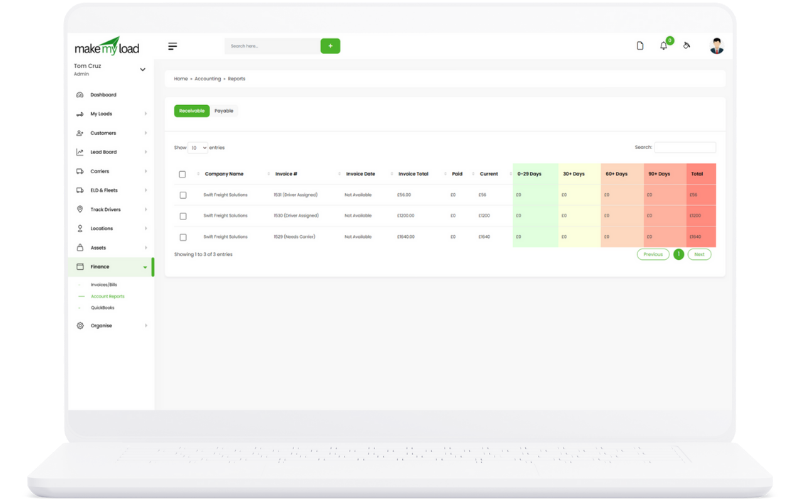
Reports

Comprehensive financial reporting system with receivable and payable reports, analytics, and insights.

Finance Management
Report Features:
  1. Receivable Reports: Track outstanding customer payments
  2. Payable Reports: Monitor carrier payment obligations
  3. Cash Flow Analysis: Analyze cash flow trends and patterns
  4. Profit & Loss: Generate P&L statements by load and period
  5. Payment Analytics: Analyze payment patterns and performance
  6. Custom Reports: Create custom financial reports
  7. Export Options: Export reports in multiple formats
  8. Scheduled Reports: Automatically generate and send reports
Key Benefits:
  • Complete financial visibility
  • Better financial decision making
  • Improved cash flow management
  • Enhanced financial planning
  • Comprehensive financial insights

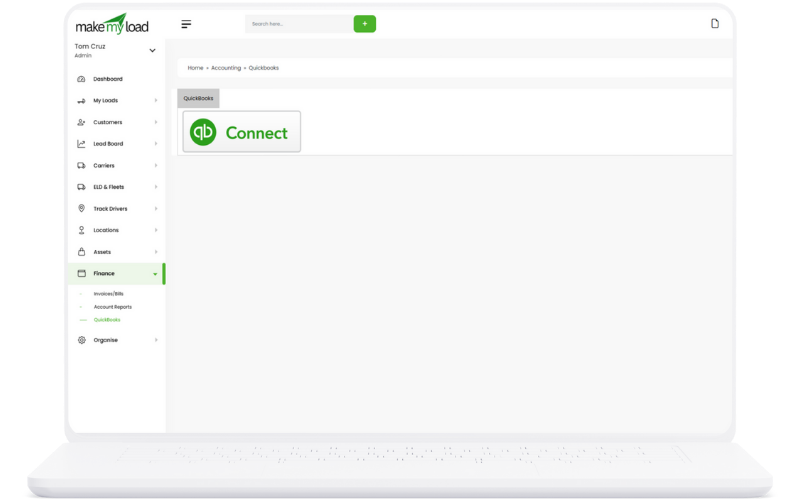
QuickBooks Integration

Seamless integration with QuickBooks for comprehensive accounting and financial management with automated data synchronization.

Finance Management
QuickBooks Integration Features:
  1. Data Synchronization: Automatic sync of financial data between TMS and QuickBooks
  2. Chart of Accounts: Map TMS accounts to QuickBooks chart of accounts
  3. Invoice Export: Export customer invoices directly to QuickBooks
  4. Payment Import: Import payment data from QuickBooks back to TMS
  5. Carrier Bills: Export carrier payment bills to QuickBooks
  6. Expense Tracking: Sync load-related expenses automatically
  7. Report Generation: Generate financial reports in both systems
  8. Error Handling: Automatic error detection and resolution
Key Benefits:
  • Unified accounting system
  • Eliminates duplicate data entry
  • Improved financial accuracy
  • Streamlined financial processes
  • Comprehensive reporting capabilities
  • Real-time financial synchronization

Lead Board/Management

Comprehensive lead management system with tracking, communication, and conversion capabilities.

Finance Management

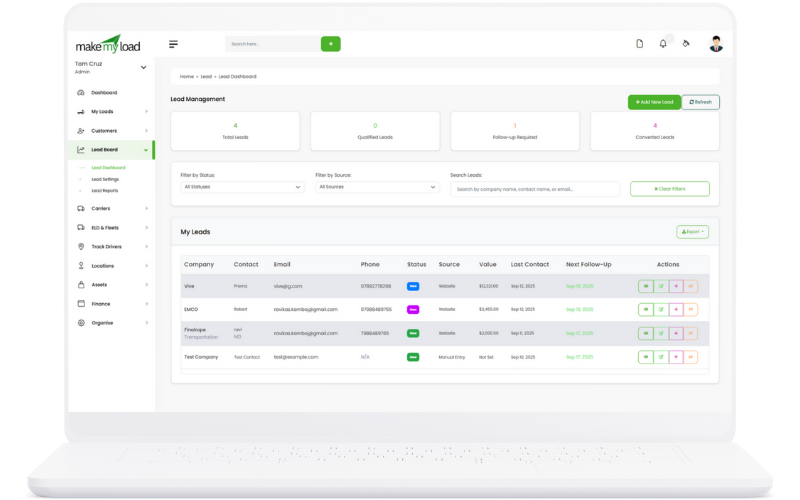
Lead Dashboard

Comprehensive lead dashboard with real-time metrics, lead pipeline visualization, and quick access to all lead management tools.

Finance Management
Dashboard Features:
  1. Lead Metrics: Total leads, conversion rate, pipeline value, response time
  2. Pipeline Visualization: Visual representation of leads by status
  3. Recent Activities: Latest lead interactions and updates
  4. Quick Actions: Add new lead, send emails, schedule calls
  5. Lead Filtering: Filter leads by status, source, date, assigned user
  6. Export Options: Export lead data to CSV for analysis
Key Benefits:
  • Real-time lead visibility
  • Quick access to lead information
  • Improved lead management efficiency
  • Better sales pipeline tracking
  • Data-driven decision making

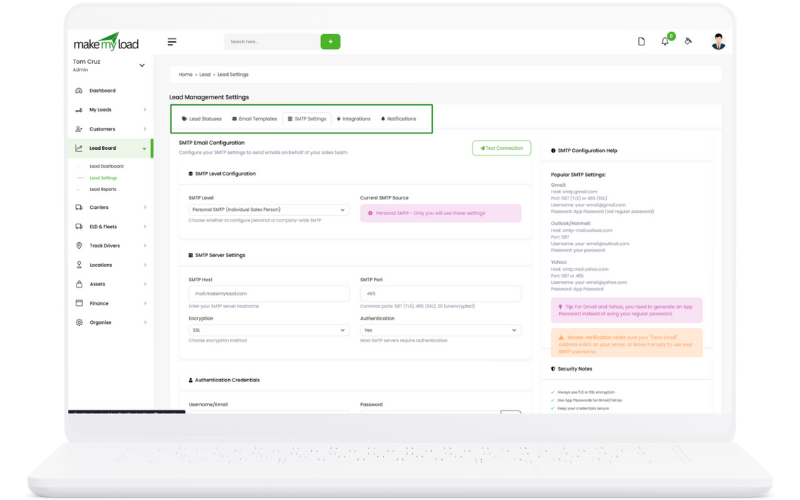
Lead Settings

Configure lead management settings including status management, email templates, SMTP configuration, and integration settings.

Finance Management
Settings Configuration:
  1. Lead Status Management: Create, edit, and manage lead statuses
  2. Email Templates: Create and manage email templates for lead communication
  3. SMTP Configuration: Set up email server settings for lead communications
  4. Integration Settings: Configure third-party integrations (MailChimp, HubSpot, Salesforce)
  5. Notification Settings: Set up automated notifications and alerts
  6. User Permissions: Configure lead access permissions for different user roles
Key Benefits:
  • Customized lead management workflow
  • Professional email communications
  • Seamless third-party integrations
  • Automated notification system
  • Role-based access control

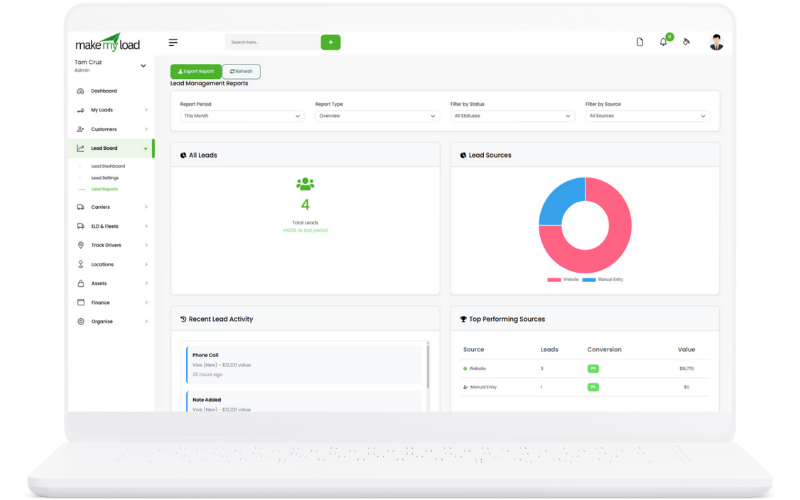
Lead Reports

Comprehensive lead reporting and analytics with conversion tracking, source analysis, and performance metrics.

Finance Management
Reporting Features:
  1. Conversion Analytics: Track lead conversion rates and trends
  2. Source Analysis: Analyze lead sources and effectiveness
  3. Performance Metrics: Monitor team performance and lead handling
  4. Pipeline Reports: Detailed pipeline analysis and forecasting
  5. Activity Reports: Track lead interactions and communication history
  6. Custom Reports: Create custom reports based on specific criteria
Key Benefits:
  • Data-driven lead management
  • Performance optimization insights
  • ROI tracking and analysis
  • Improved sales forecasting
  • Team performance monitoring

ELD & Fleets

Comprehensive Electronic Logging Device (ELD) and fleet management system with driver tracking and compliance monitoring.

Finance Management

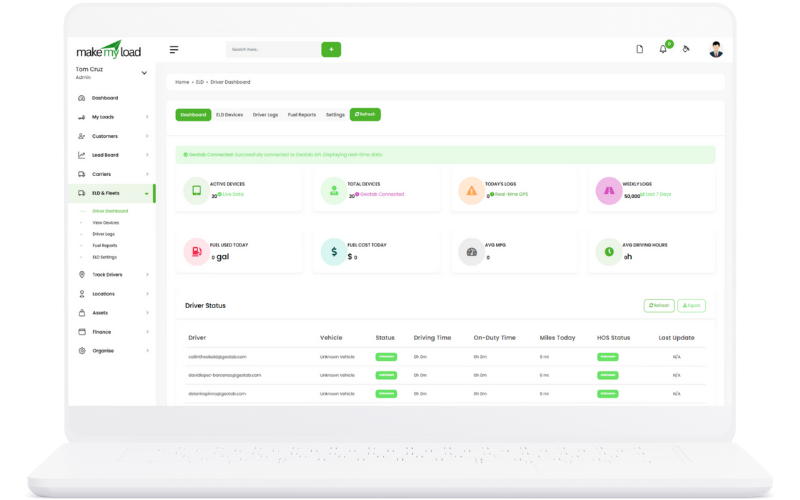
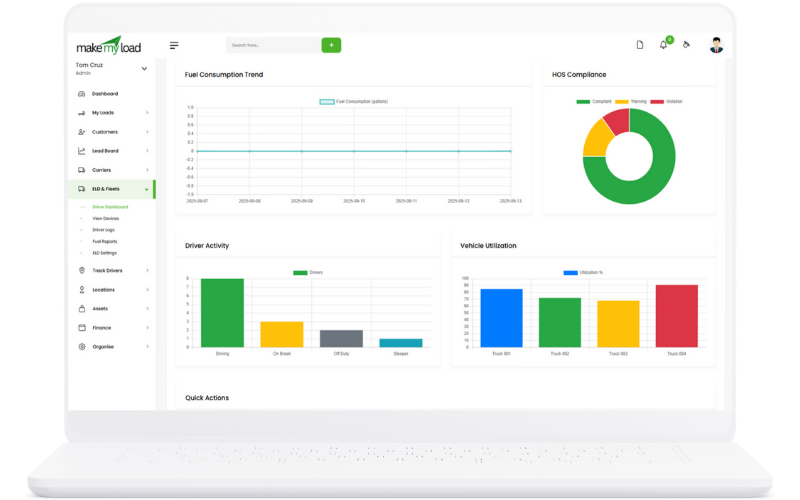
Driver Dashboard

Comprehensive driver dashboard with real-time status, hours of service tracking, and compliance monitoring.

Finance Management
Dashboard Features:
  1. Driver Status: Current driver status (On Duty, Driving, Off Duty, Sleeper)
  2. Hours of Service: Real-time HOS tracking and remaining hours
  3. Compliance Alerts: HOS violations and compliance warnings
  4. Current Load: Active load information and delivery status
  5. Location Tracking: Real-time GPS location and route information
  6. Performance Metrics: Driver performance scores and statistics
Key Benefits:
  • Real-time driver visibility
  • HOS compliance monitoring
  • Improved safety management
  • Performance tracking
  • Regulatory compliance

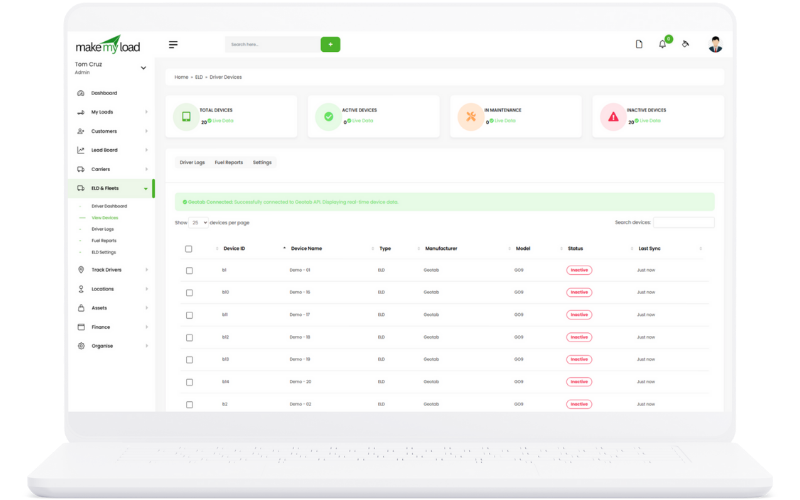
View Devices

Monitor and manage all ELD devices in your fleet with device status, connectivity, and maintenance tracking.

Finance Management
Device Management Features:
  1. Device Status: Monitor device connectivity and operational status
  2. Fleet Overview: View all devices across your fleet
  3. Device Health: Track device performance and battery status
  4. Maintenance Alerts: Receive alerts for device maintenance needs
  5. Software Updates: Manage device software updates and patches
  6. Device Assignment: Assign devices to specific vehicles and drivers
Key Benefits:
  • Centralized device management
  • Proactive maintenance alerts
  • Improved device reliability
  • Reduced downtime
  • Better fleet visibility

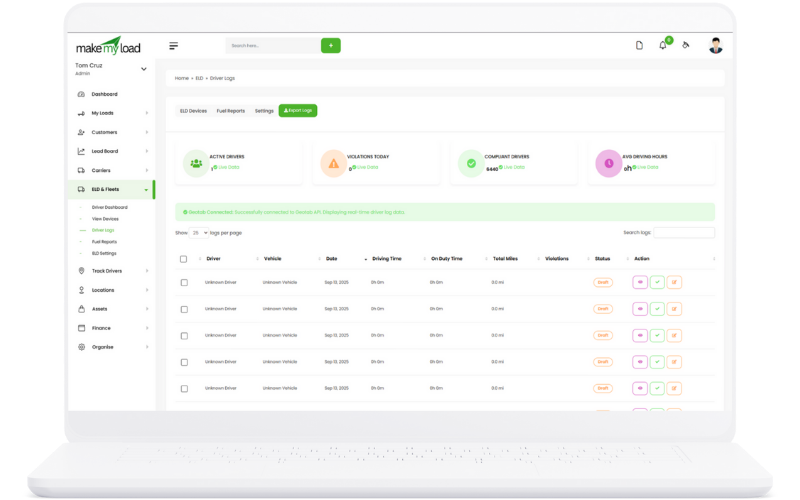
Driver Logs

Comprehensive driver log management with HOS tracking, duty status changes, and compliance reporting.

Finance Management
Log Management Features:
  1. HOS Tracking: Automatic hours of service tracking and logging
  2. Duty Status: Track duty status changes (On Duty, Driving, Off Duty, Sleeper)
  3. Log Editing: Edit and annotate driver logs with proper documentation
  4. Compliance Reports: Generate DOT compliance reports
  5. Violation Alerts: Real-time HOS violation notifications
  6. Log Certification: Driver log certification and submission
Key Benefits:
  • DOT compliance management
  • Automated HOS tracking
  • Reduced paperwork
  • Violation prevention
  • Audit trail maintenance

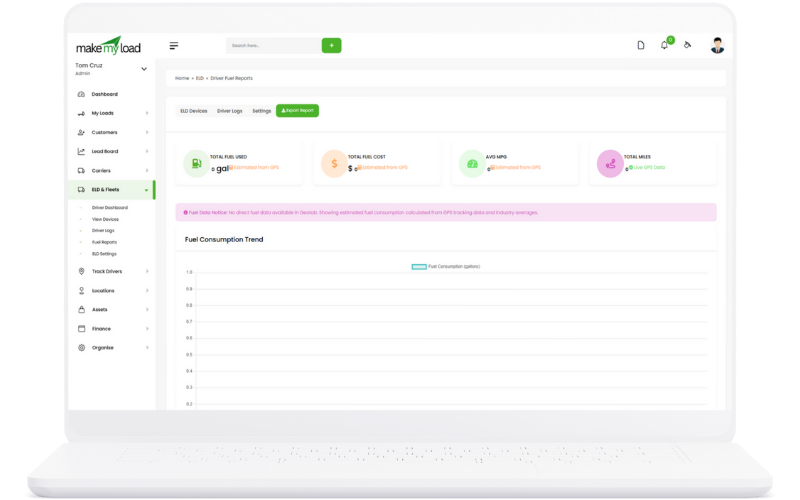
Fuel Reports

Comprehensive fuel tracking and reporting with consumption analysis, cost management, and efficiency monitoring.

Finance Management
Fuel Reporting Features:
  1. Fuel Consumption: Track fuel consumption by vehicle and driver
  2. Cost Analysis: Monitor fuel costs and budget tracking
  3. Efficiency Metrics: Calculate MPG and fuel efficiency
  4. Fuel Card Integration: Integrate with fuel card systems
  5. Expense Reports: Generate fuel expense reports for accounting
  6. Trend Analysis: Analyze fuel consumption trends and patterns
Key Benefits:
  • Cost control and optimization
  • Fuel efficiency monitoring
  • Expense tracking and reporting
  • Budget management
  • Performance analysis

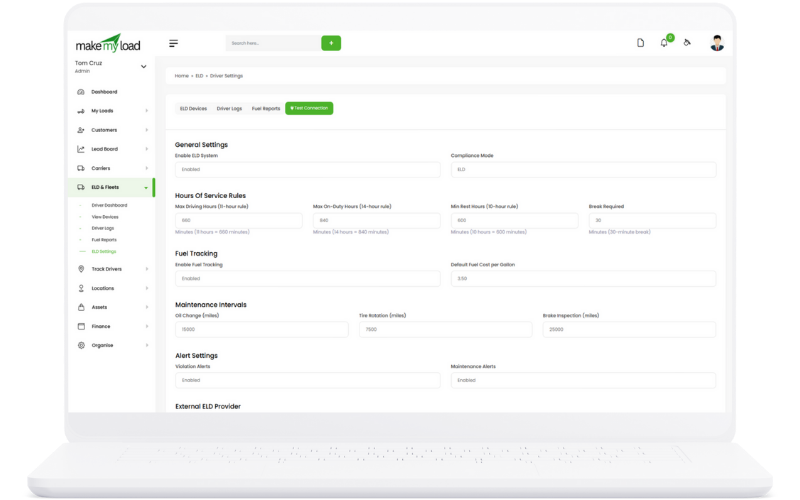
ELD Settings

Configure ELD system settings including device management, compliance rules, and integration settings.

Finance Management
ELD Configuration:
  1. Device Configuration: Set up and configure ELD devices
  2. Compliance Rules: Configure DOT compliance rules and regulations
  3. HOS Rules: Set up hours of service rules and limits
  4. Alert Settings: Configure violation alerts and notifications
  5. Integration Settings: Set up integrations with other systems
  6. User Permissions: Configure access permissions for different user roles
Key Benefits:
  • Customized ELD configuration
  • Regulatory compliance
  • Automated rule enforcement
  • System integration
  • Role-based access control

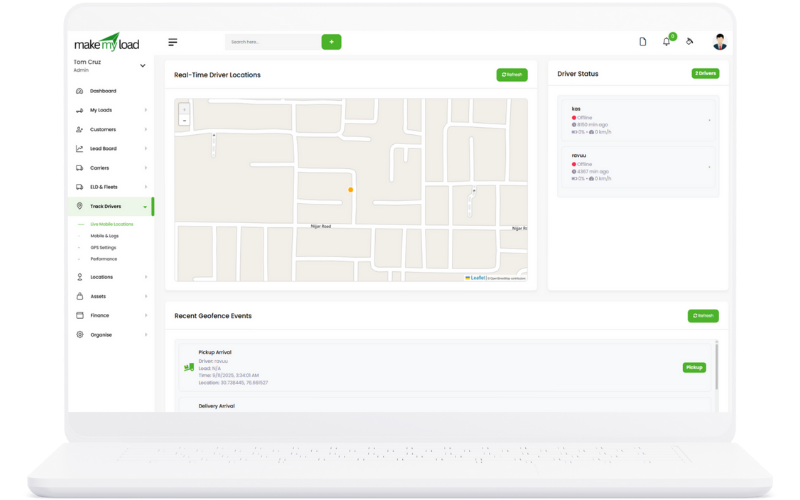
Mobile Tracking/Track Drivers

Real-time mobile tracking and driver monitoring with GPS integration, performance analytics, and location management.

Finance Management

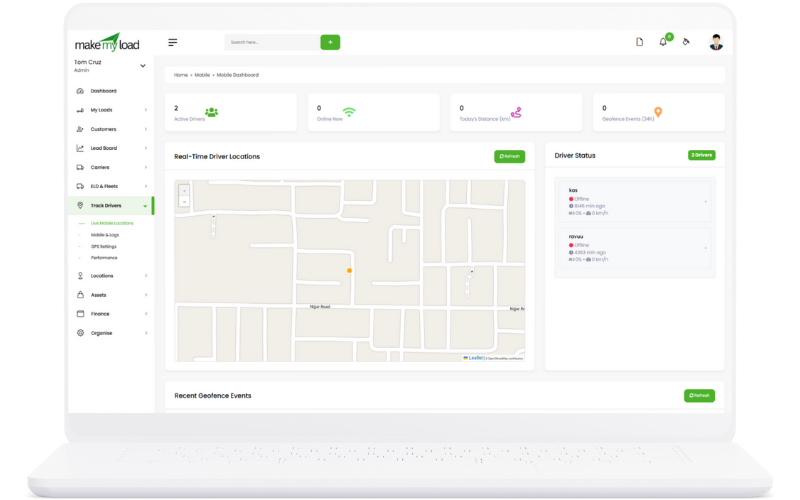
Live Mobile Locations

Real-time GPS tracking of all mobile devices and vehicles with live location updates and route monitoring.

Finance Management
Location Tracking Features:
  1. Real-time GPS: Live location tracking with GPS coordinates
  2. Route Monitoring: Track planned vs actual routes
  3. Geofencing: Set up geofenced areas with automatic alerts
  4. Speed Monitoring: Track vehicle speed and speed violations
  5. Location History: View historical location data and routes
  6. Multi-device Tracking: Track multiple devices simultaneously
Key Benefits:
  • Real-time visibility
  • Improved route optimization
  • Enhanced security
  • Better customer service
  • Fleet efficiency

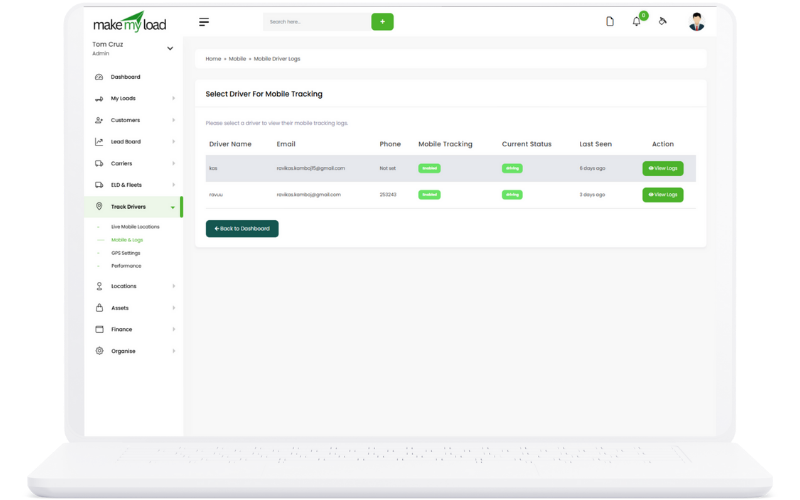
Mobile & Logs

Comprehensive mobile device logs with driver activity tracking, device status monitoring, and communication logs.

Finance Management
Mobile Logging Features:
  1. Device Activity: Track mobile device usage and activity
  2. Driver Logs: Monitor driver activities and status changes
  3. Communication Logs: Track calls, messages, and app usage
  4. Battery Status: Monitor device battery levels and charging
  5. Network Status: Track connectivity and data usage
  6. App Usage: Monitor app usage and performance
Key Benefits:
  • Complete activity tracking
  • Device performance monitoring
  • Communication oversight
  • Battery optimization
  • Usage analytics

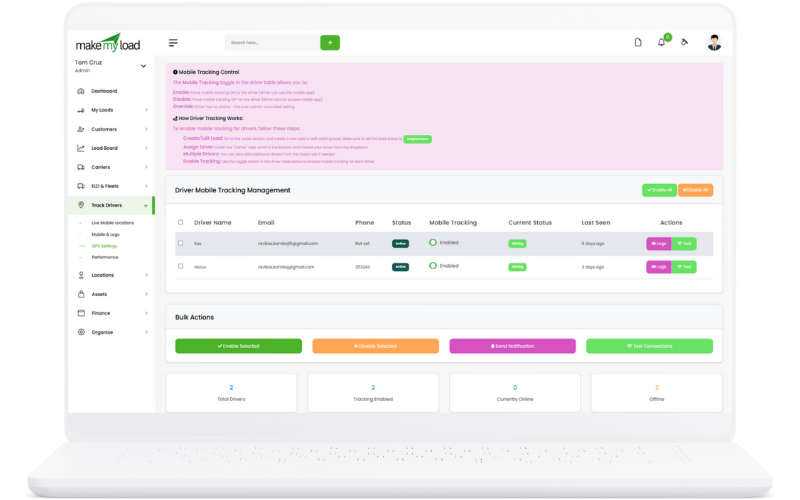
GPS Settings

Configure GPS tracking settings including update frequency, accuracy requirements, and location-based alerts.

Finance Management
GPS Configuration:
  1. Update Frequency: Set GPS update intervals and frequency
  2. Accuracy Settings: Configure GPS accuracy requirements
  3. Battery Optimization: Balance tracking accuracy with battery life
  4. Geofence Settings: Configure geofenced areas and alerts
  5. Offline Tracking: Set up offline location tracking
  6. Privacy Settings: Configure location privacy and data sharing
Key Benefits:
  • Optimized tracking performance
  • Battery life optimization
  • Customized alert settings
  • Privacy control
  • Flexible configuration

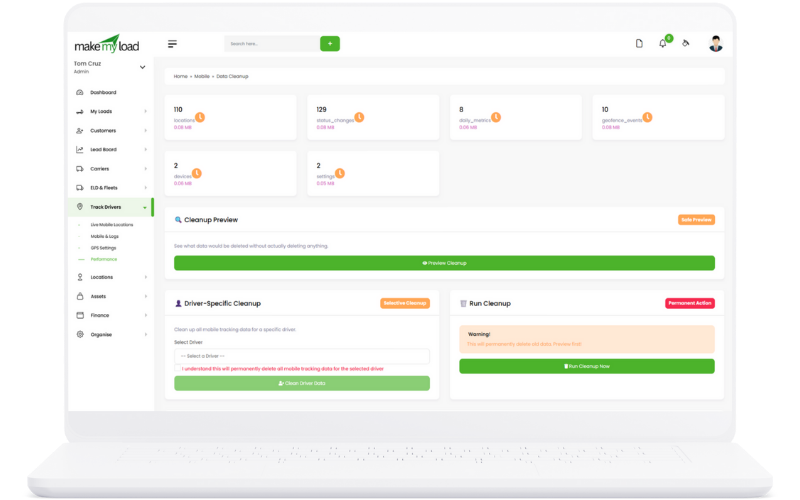
Performance

Comprehensive performance analytics with driver efficiency metrics, route optimization, and fleet performance monitoring.

Finance Management
Performance Analytics:
  1. Driver Performance: Track driver efficiency and performance metrics
  2. Route Optimization: Analyze route efficiency and optimization opportunities
  3. Fuel Efficiency: Monitor fuel consumption and efficiency trends
  4. Idle Time Tracking: Track vehicle idle time and optimization
  5. Speed Analysis: Monitor speed patterns and violations
  6. Performance Reports: Generate comprehensive performance reports
Key Benefits:
  • Performance optimization
  • Cost reduction
  • Efficiency improvements
  • Data-driven decisions
  • ROI tracking

Driver APP (Web View)

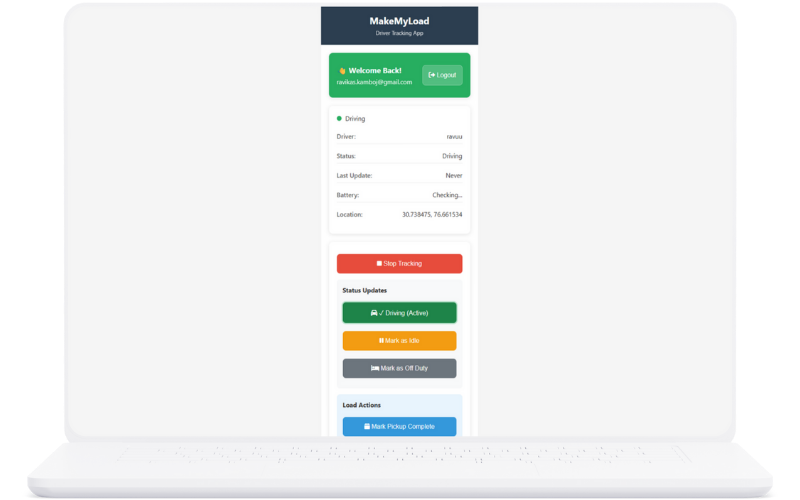
Comprehensive driver mobile application for pickup, delivery management, status updates, and real-time communication.

Mobile Tracking
Driver APP Features:
  1. Pickup Management: Mark pickup dates and confirm pickup completion
  2. Delivery Management: Update delivery dates and mark delivery completion
  3. Expected Delivery Dates: Set and update expected delivery dates
  4. Load Status Updates: Update load status (Picked up, In Transit, Delivered)
  5. Driving Status: Set driving status (On Duty, Off Duty, Driving, On Break)
  6. Real-time Communication: Communicate with dispatch and customers
  7. Document Upload: Upload delivery receipts and proof of delivery
  8. GPS Tracking: Real-time location sharing and route tracking
Key Benefits:
  • Real-time status updates
  • Improved communication
  • Better load tracking
  • Enhanced customer service
  • Reduced manual reporting
  • Mobile accessibility

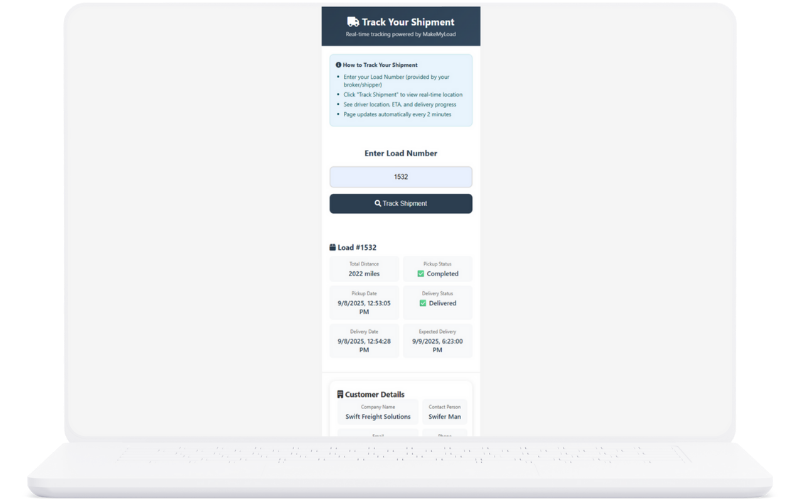
Customer APP (Web View)

Customer-facing mobile application for freight tracking, delivery updates, and real-time shipment monitoring.

Mobile Tracking
Customer APP Features:
  1. Freight Tracking: Real-time tracking of freight shipments
  2. Pickup Dates: View scheduled and actual pickup dates
  3. Delivery Dates: Track scheduled and actual delivery dates
  4. Expected Delivery: View expected delivery dates and updates
  5. Status Updates: Receive real-time status notifications
  6. Location Tracking: See current location of freight
  7. Delivery Confirmation: Confirm delivery completion
  8. Communication: Direct communication with drivers and dispatch
Key Benefits:
  • Real-time freight visibility
  • Improved customer satisfaction
  • Reduced customer inquiries
  • Better delivery planning
  • Enhanced communication
  • Professional customer experience

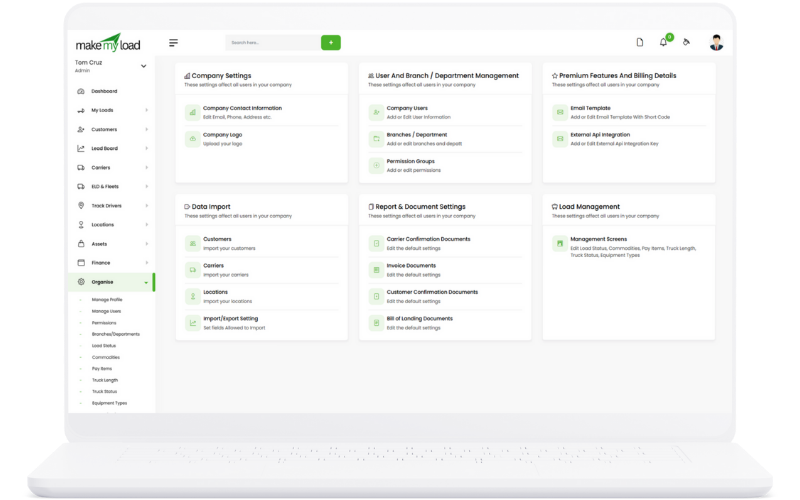
Settings & Configuration

Configure your TMS to match your company structure and user roles with comprehensive settings management.

Mobile Tracking

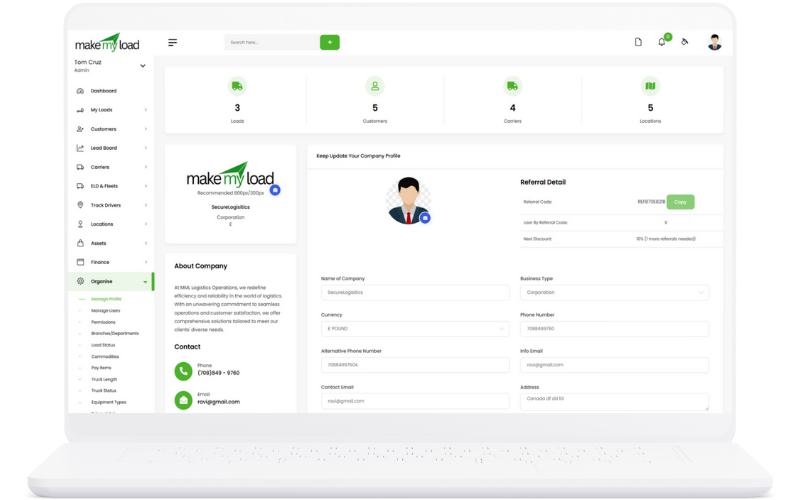
Company Profile and Key Statistics Management

Manage your company profile information and track key business statistics for comprehensive company management.

Mobile Tracking
Company Profile Management:
  1. Company Information: Name, address, phone, email, website, tax ID
  2. Business Details: Industry type, business size, operating regions
  3. Key Statistics: Total loads, active customers, carrier count, revenue tracking
  4. Performance Metrics: Load completion rate, customer satisfaction, on-time delivery
  5. Logo and Branding: Upload company logo and brand colors
  6. Document Templates: Customize invoice, BOL, and other document templates
Key Benefits:
  • Professional company presentation
  • Comprehensive business tracking
  • Performance monitoring
  • Brand consistency
  • Customized documentation

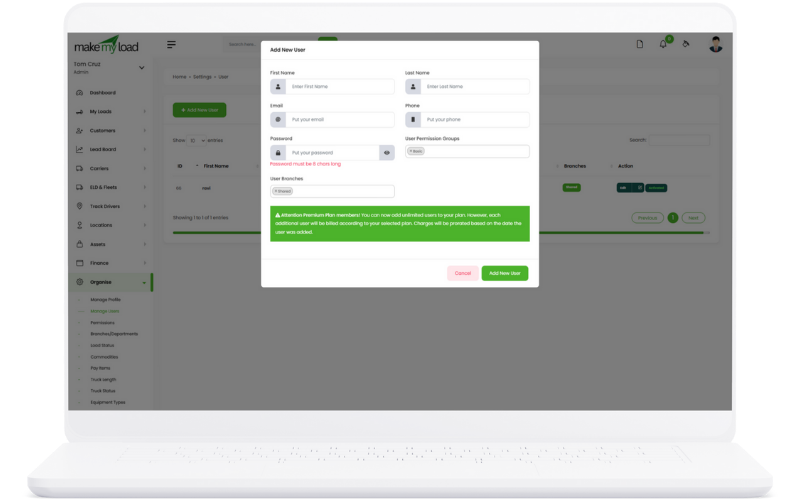
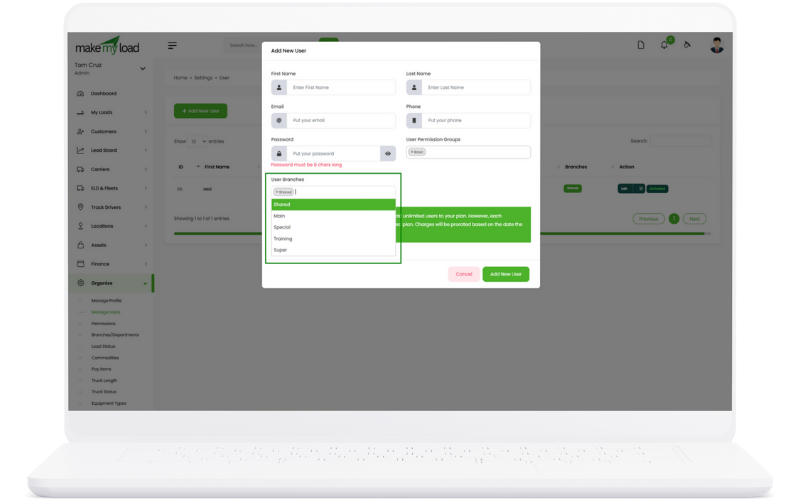
User Creation and Management

Create and manage users with comprehensive role assignments and branch assignments for organized access control.

Mobile Tracking
User Management Process:
  1. User Creation: Add new users with basic information (name, email, phone)
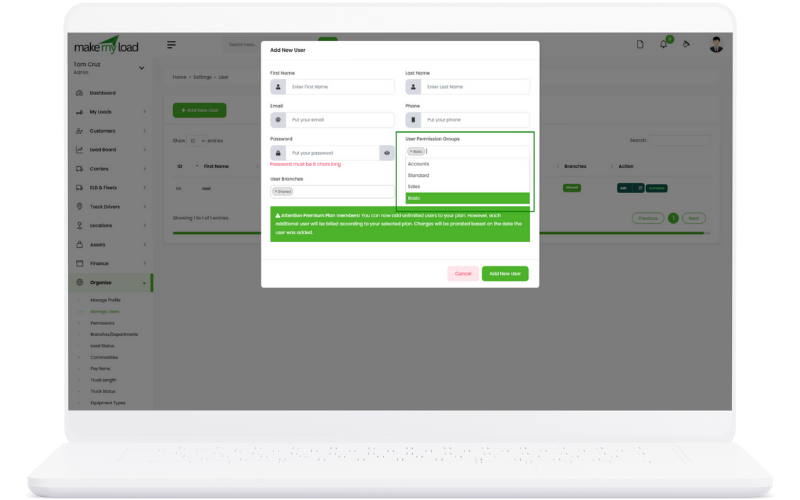
  2. Role Assignment: Assign specific roles (Admin, Manager, Dispatcher, Driver)
  3. Branch Assignment: Assign users to specific company branches
  4. Permission Settings: Configure detailed permissions for each user
  5. Access Control: Set login credentials and password policies
  6. User Status: Activate, deactivate, or suspend user accounts
Key Benefits:
  • Organized user management
  • Role-based access control
  • Branch-specific assignments
  • Security and compliance
  • Scalable user administration

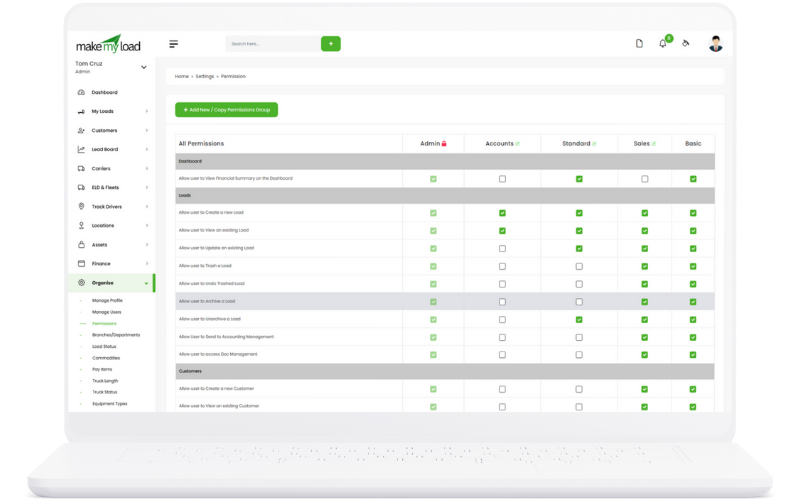
User Role Assignment and Permissions

Assign comprehensive user roles including Sales Executive, Manager, Owner, Financier, and custom roles with detailed permissions.

Mobile Tracking Mobile Tracking
Role Assignment Features:
  1. Predefined Roles: Sales Executive, Manager, Owner, Financier, Dispatcher, Driver
  2. Custom Roles: Create custom roles for specific business needs
  3. Permission Matrix: Detailed permission settings for each role
  4. Module Access: Control access to specific TMS modules
  5. Data Visibility: Set data visibility rules for each role
  6. Action Permissions: Control create, edit, delete, and view permissions
Key Benefits:
  • Flexible role management
  • Granular permission control
  • Security compliance
  • Customizable access levels
  • Audit trail for role changes

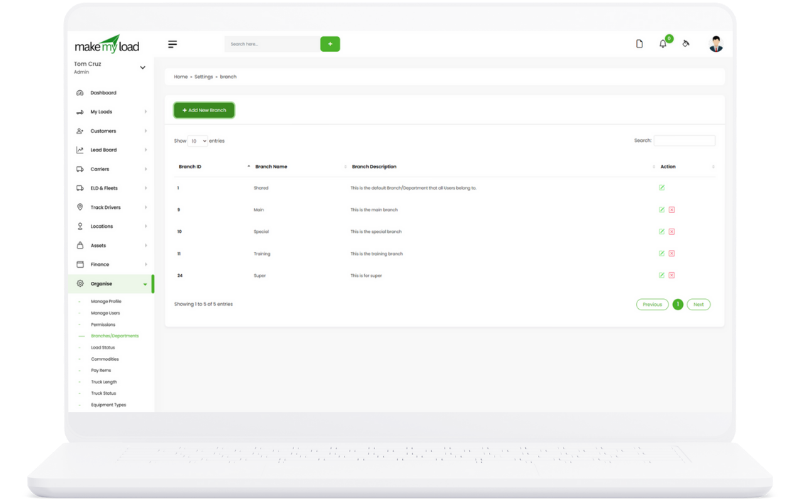
Branches and Departments Management

Manage company branches and departments for organized operations and location-based management.

Mobile Tracking Mobile Tracking
Branch Management Process:
  1. Branch Creation: Add new branches with location details
  2. Department Setup: Create departments within each branch
  3. Hierarchy Management: Set up organizational hierarchy
  4. Territory Assignment: Define service territories for each branch
  5. Resource Allocation: Assign users and assets to branches
  6. Reporting Structure: Configure branch-specific reporting
Key Benefits:
  • Organized company structure
  • Location-based management
  • Territory optimization
  • Branch-specific reporting
  • Scalable organization

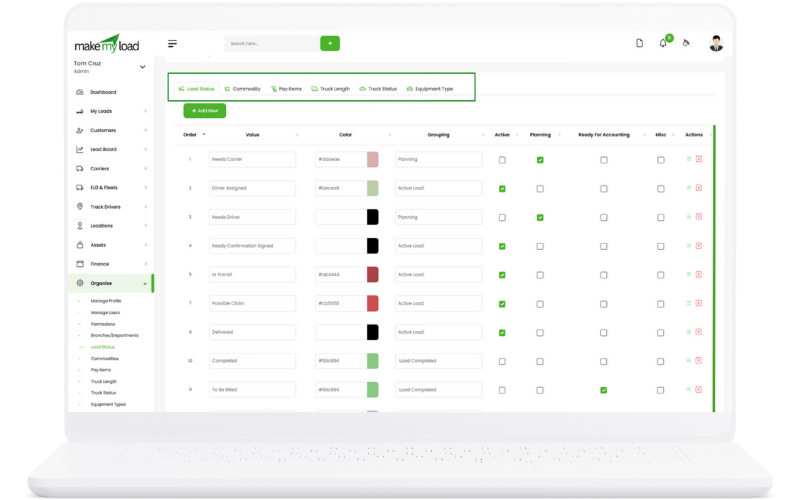
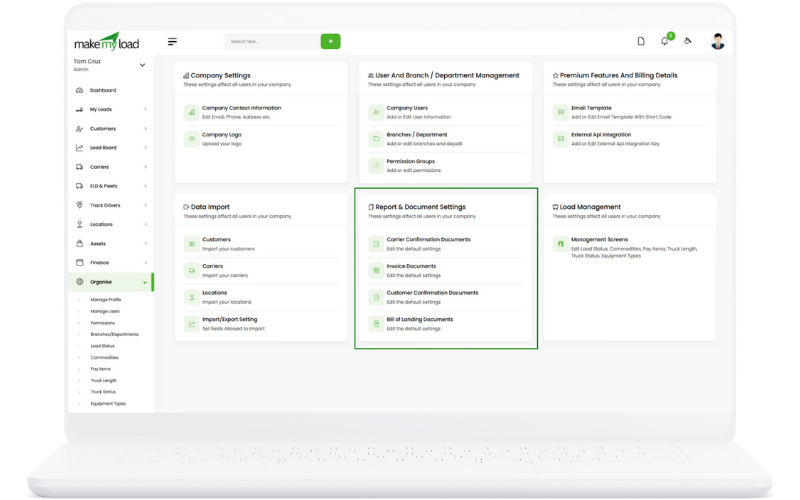
Load-Related Configuration Settings

Configure load-related settings including Load Status, Commodity, Pay Items, Truck Length, Truck Status, and Equipment Type.

Mobile Tracking Mobile Tracking
Load Configuration Options:
  1. Load Status: Configure load status options (Active, Pending, Completed, Cancelled)
  2. Commodity Types: Set up commodity categories and types
  3. Pay Items: Define pay item categories and rates
  4. Truck Length: Configure truck length options and specifications
  5. Truck Status: Set up truck status options (Available, In Transit, Maintenance)
  6. Equipment Type: Define equipment types (Dry Van, Refrigerated, Flatbed)
Key Benefits:
  • Customized load management
  • Industry-specific configurations
  • Consistent data entry
  • Improved reporting accuracy
  • Flexible configuration options

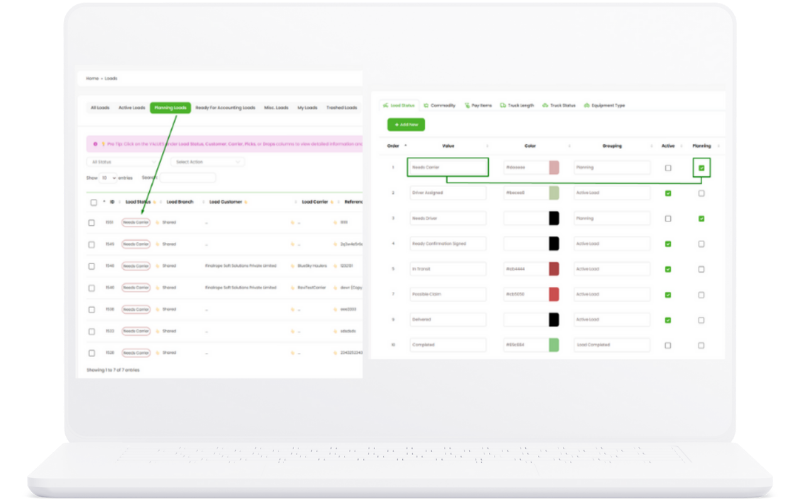
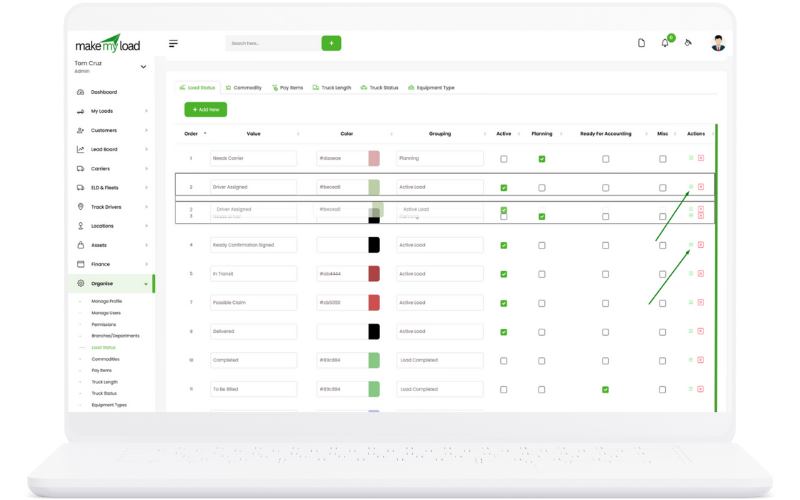
Sort and Group Values for Better Reporting

Organize and group configuration values for improved reporting and data analysis with custom sorting options.

Mobile Tracking Mobile Tracking
Sorting and Grouping Features:
  1. Value Sorting: Sort configuration values alphabetically or by priority
  2. Grouping Options: Group related values for better organization
  3. Priority Settings: Set priority levels for different values
  4. Custom Categories: Create custom categories for value grouping
  5. Report Templates: Configure default sorting for reports
  6. User Preferences: Allow users to set personal sorting preferences
Key Benefits:
  • Improved data organization
  • Better reporting accuracy
  • Customized data presentation
  • Enhanced user experience
  • Flexible reporting options

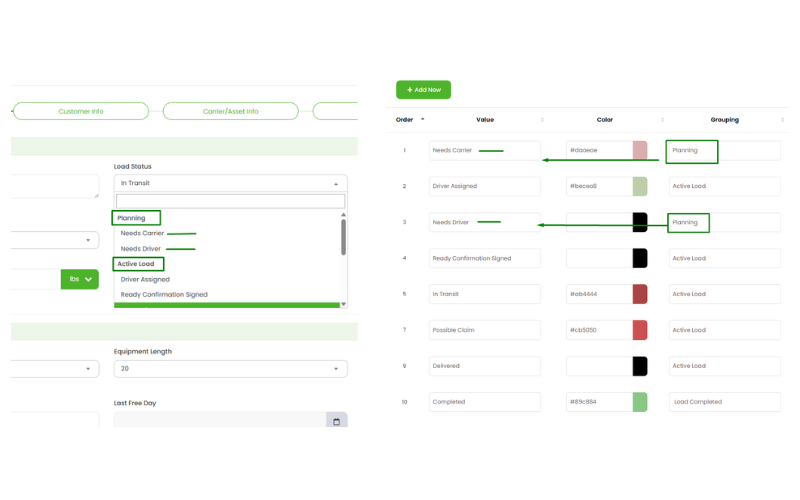
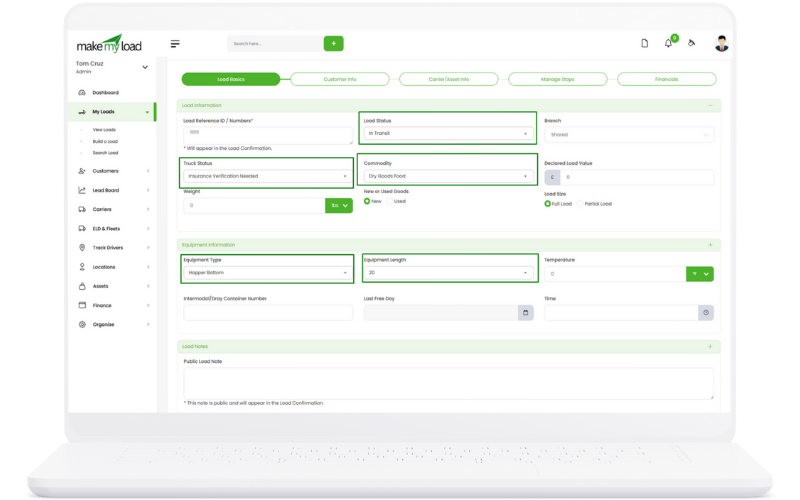
Dropdown Configuration for Load Creation

Configure dropdown values that appear during load creation and throughout the system for consistent data entry.

Mobile Tracking Mobile Tracking
Dropdown Configuration Process:
  1. Value Management: Add, edit, and delete dropdown values
  2. Load Creation Integration: Values appear in load creation forms
  3. System-wide Consistency: Values used across all modules
  4. Validation Rules: Set validation rules for dropdown selections
  5. Default Values: Set default selections for new records
  6. Conditional Logic: Configure dependent dropdowns
Key Benefits:
  • Consistent data entry
  • Reduced input errors
  • Standardized options
  • Improved user experience
  • Better data quality

Terms Management for Carriers, Customers, and Locations

Manage terms and conditions for carriers, customers, locations, and bills of lading with comprehensive template management.

Mobile Tracking
Terms Management Features:
  1. Carrier Terms: Set standard terms for carrier agreements
  2. Customer Terms: Define customer service terms and conditions
  3. Location Terms: Configure pickup and delivery terms
  4. BOL Templates: Create customizable bill of lading templates
  5. Legal Clauses: Add standard legal clauses and disclaimers
  6. Version Control: Track changes and maintain term history
Key Benefits:
  • Standardized terms and conditions
  • Legal compliance
  • Reduced contract disputes
  • Professional documentation
  • Consistent business practices

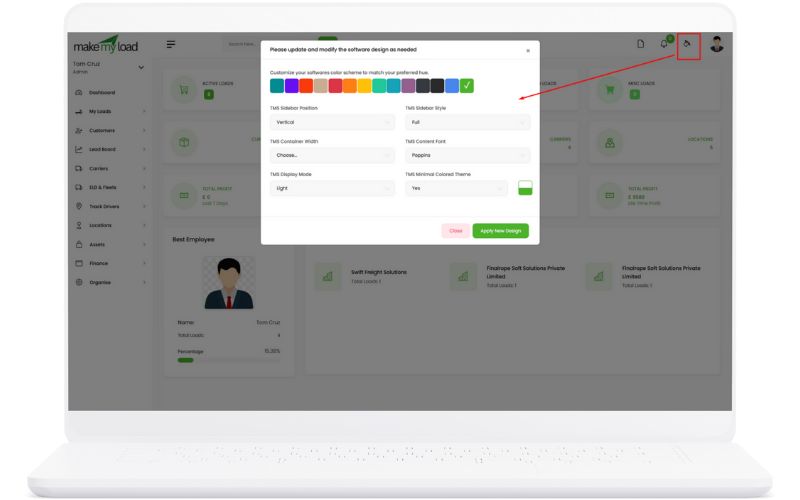
Appearance and Branding Customization

Customize TMS appearance and branding to match your company identity with flexible styling options.

Mobile Tracking
Branding Customization Options:
  1. Color Scheme: Apply company colors throughout the system
  2. Logo Integration: Upload and display company logo
  3. Sidebar Layout: Customize sidebar appearance (horizontal, small icons)
  4. Frontend Display: Personalize customer-facing interface
  5. Document Templates: Brand invoices, BOLs, and other documents
  6. Email Templates: Customize email communications with branding
Key Benefits:
  • Professional brand presentation
  • Consistent visual identity
  • Improved user experience
  • Customized interface
  • Brand recognition

Getting Started

Follow these steps to get started with MakeMyLoad TMS and maximize your productivity.

Initial Setup
  1. Configure your company profile in Settings
  2. Set up user accounts and assign roles
  3. Configure branches and departments
  4. Set up load statuses and commodities
  5. Configure payment terms and billing settings
Data Import
  1. Import existing customers and carriers
  2. Set up locations and contacts
  3. Configure asset information
  4. Import historical load data (if available)
  5. Set up email templates and SMTP
Best Practices
  • Start with a few test loads to familiarize yourself with the system
  • Use the mobile app for real-time tracking
  • Set up automated email templates for common communications
  • Regularly review and update carrier insurance information
  • Use the reporting features to track performance metrics

Support & Resources

Get help when you need it with our comprehensive support resources.

Technical Support

24/7 technical support for all users

Contact Support
Training

Comprehensive training programs available

Request Training
Documentation

Detailed guides and API documentation

View Docs